Key takeaways
- Replacement batteries for the Dell Studio 1555, matched by WU946 and related part numbers, with 6-cell and extended 9-cell options and a fitment checklist.
As an Amazon Associate we earn from qualifying purchases.
The Dell Studio 1555 is an older laptop that still earns its keep for writing, browsing, media and light work — until the battery gives up. When a Studio 1555 that once ran for hours unplugged now dies in minutes, shows a permanent battery warning, or only works tethered to the wall, the battery is almost always the part at fault, and on this model it is also one of the easiest parts to replace: the pack is externally mounted and user-removable, with no need to open the chassis.
The catch is fitment. The Studio 1555 belongs to Dell’s Studio 15 family, and its battery is shared across several sibling models under a long list of Dell part numbers. Buy by those part numbers — not by a vague promise that a battery fits Dell laptops — and the replacement drops in and works. Buy carelessly and you get a pack with the wrong connector, the wrong latch geometry, or cells that the laptop’s charging system rejects. This guide covers only replacement laptop batteries of the correct type for the Studio 1555, explains the part numbers and the 6-cell versus 9-cell decision, and walks through fitting and first-charge practice.
Affiliate Disclosure: This article contains affiliate links. If you buy through a link on this page, we may earn a commission at no extra cost to you.
Confirm the battery type before you buy anything
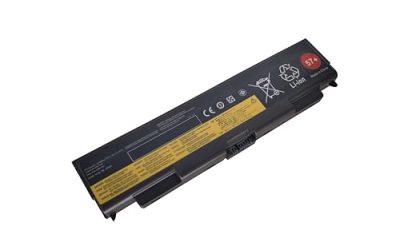
Flip your Studio 1555 over and slide the release latch to remove the existing pack. On the label you should find a Dell type or part number. The standard battery for this family is the Type WU946, a 6-cell lithium-ion pack rated at 11.1 volts and 56Wh in Dell’s original specification. Replacements are cross-referenced against a long list of equivalent Dell part numbers, including WU960, WU959, WU965, MT264, MT275, MT276, MT277, KM887, KM898, KM901, KM904, KM905, KM958, KM965, PW772, PW773, RM803, RM804, 312-0701 and 312-0702.
If your old pack carries one of those numbers, any of the picks below that lists it is mechanically and electrically the right family. The same pack also fits the sibling Studio models it was sold with — Studio 1535, 1536, 1537, 1557 and 1558, and the PP33L and PP39L designations — which is why listings name those models alongside the 1555. Do not confuse this battery with packs for the Studio 17 line, the Studio XPS 16, or any Inspiron model: similar era, similar styling, different battery. Also check the shape against your old pack. A correct listing should show the same long, slim profile that spans the rear underside of the machine.
One more check is worth doing before spending anything. If the laptop also fails to charge a known-good battery, or the power jack is loose and cuts out when wiggled, the fault may be the charger or the DC jack rather than the pack. Test with the original Dell adapter if you can, confirm the machine runs normally on mains power, and only then order a battery.
6-cell or 9-cell: the one real decision
Replacement Studio 1555 batteries come in two physical formats, and choosing between them is the main decision in this purchase.
The standard 6-cell format matches the original pack: it sits flush with the base of the laptop and keeps the machine’s original weight and profile. Capacity varies by maker — common ratings are around 4400mAh and 49Wh for standard cells, up to about 5200mAh and 58Wh for higher-capacity 6-cell builds using better cells. For most owners reviving a 1555 for everyday use, a good 6-cell is the right answer.
The extended 9-cell format packs roughly half as much energy again — a typical rating is 7800mAh at 11.1 volts — but the extra cells have to go somewhere. A 9-cell pack protrudes from the base, usually downward or to the rear, raising the back of the laptop and adding noticeable weight. Some people like the slight keyboard tilt and the extra runtime for travel or field work. Others find the bulge stops the laptop sitting flat in a bag or on a desk. Neither is wrong; just buy the format with your eyes open, because listings do not always shout about the protrusion.
Whichever format you choose, be sceptical of capacity claims that sound far beyond these ranges for the stated cell count. Watt-hours are the honest comparison figure: divide by the 11.1-volt rating and you get the milliamp-hour figure, and any listing where those two numbers do not roughly agree deserves a pass.
Our picks
1. GHU WU946, 58Wh, 6-cell — the high-capacity standard-fit pick

- Type: Lithium-ion, 6-cell
- Rating: 58Wh, 11.1V, per GHU’s listing
- Replaces: WU946 and the cross-referenced family including KM958, 312-0701, 312-0702, KM901, KM905 and MT264
- Fits: Dell Studio 1535, 1536, 1537, 1555, 1557 and 1558
GHU’s WU946 is the pick for owners who want the flush-fitting original format with as much energy as a 6-cell shell sensibly holds. Its 58Wh rating sits slightly above Dell’s original 56Wh specification for the WU946, which reflects modern cell capacity rather than a different battery type — the voltage, connector and fitment family are the standard ones, and the listing names the Studio 1555 and its part-number family explicitly. For a machine used around the house and on occasional trips, this is the balanced choice: original ergonomics, the strongest standard-size rating we could verify from listing information, and no surprises in the bag.
As with any third-party laptop pack, judge it in the first week: fit the pack, charge it fully, and run the laptop down on battery while you work. A healthy replacement should be recognised by the Studio 1555 without errors, charge to full, and discharge smoothly rather than dropping suddenly from a middling percentage to empty.
2. BND WU946, 49Wh, 6-cell — the standard-capacity value pick
- ASIN: N/A — see the note below
- Type: Lithium-ion, 6-cell
- Rating: 4400mAh, 49Wh, 11.1V (also stated as compatible with 10.8V labelling), per BND’s listing
- Replaces: WU946, WU960, WU965, MT264, MT275, MT276, MT277, PW772, PW773, KM904, KM905, KM958, KM965, 312-0701, 312-0702 and related numbers
- Fits: Dell Studio 1535, 1536, 1537, 1555, 1557, 1558, PP33L and PP39L
BND’s WU946 is the straightforward standard-capacity replacement: 4400mAh and 49Wh in the flush 6-cell format, with the full cross-reference list of Dell part numbers published in its listing and safety certifications stated as CE, FCC, RoHS and UL. That published part-number list is exactly what a careful buyer wants to see, because it lets you match the number printed on your own old pack before ordering rather than trusting a headline.
We list this pick with ASIN N/A because we could not confirm a current Amazon US ASIN for the BND listing from the sources available when this guide was prepared, even though the product and its specifications are documented in retailer and review listings. If you shop for it, buy from a listing that shows the same 4400mAh, 49Wh, 6-cell WU946 specification and the part-number list above, and avoid listings that borrow the name without the numbers.
3. AC Doctor WU946, 7800mAh, 9-cell — the extended-runtime pick
- ASIN: N/A — see the note below
- Type: Lithium-ion, 9-cell extended pack
- Rating: 7800mAh, 11.1V, per AC Doctor’s listing
- Replaces: WU946, WU960, MT276, MT264, KM905, KM904, KM887 and PW773, among others
- Fits: Dell Studio 15, 1535, 1536, 1537, 1555, 1557 and 1558, PP33L and PP39L
For the owner who genuinely works away from a socket — trains, site visits, long meetings — the 9-cell format is the only way to get substantially more runtime from a Studio 1555, and AC Doctor’s 7800mAh pack is the documented extended option for this family. That capacity is roughly half as much again as a standard 6-cell pack, which translates directly into longer unplugged sessions for the same workload.
The trade-offs are physical, and they are listed plainly in this guide so they do not surprise you: the pack protrudes from the base of the laptop, lifts the rear of the machine, and adds weight. Check that your laptop bag and any docking or cooling arrangement you use still work with the deeper pack. We list this pick with ASIN N/A for the same reason as the BND above — the product and its 7800mAh, 9-cell specification are documented for the Studio family, but we could not confirm a current Amazon US ASIN from the sources available during preparation. Shop by the exact specification and part numbers, not by brand name alone.
Quick comparison
| Pick | Format | Rating | Fit | Best for |
|---|---|---|---|---|
| GHU WU946 | 6-cell | 58Wh, 11.1V | Flush, standard | Most owners; strongest standard-size rating |
| BND WU946 | 6-cell | 4400mAh, 49Wh, 11.1V | Flush, standard | Value replacement with full part-number list |
| AC Doctor WU946 | 9-cell | 7800mAh, 11.1V | Protrudes, extended | Maximum runtime away from a socket |
Fitting the new battery
Replacement on the Studio 1555 is a two-minute job. Shut the laptop down fully — do not rely on sleep — and disconnect the charger. Turn the machine over on a soft surface, slide the battery release latch, and lift the old pack out. Seat the new pack in the bay, press it down until the latch clicks, and give it a gentle tug to confirm it is locked. Reconnect the charger and let the pack charge to full before the first unplugged run; the charging light behaviour should match what the machine showed with its original battery when new.
For the first cycle, use the laptop on battery until it reaches a low but safe level, then charge it fully again. This helps the laptop’s battery gauge calibrate to the new pack, so the percentage and time estimates you see afterwards are meaningful. If the gauge still behaves erratically after two or three cycles, check that the pack is fully seated and the contacts are clean and bright on both the battery and the bay.
Getting the most life from the replacement
A Studio 1555 is old enough that its replacement battery will likely outlive the rest of the machine if it is treated reasonably. Heat is the main enemy: avoid leaving the laptop in a hot car, keep the vents clear, and do not store the machine for months with the battery completely flat or baking on charge in a warm room. For a laptop that lives permanently on a desk, removing the pack and storing it partly charged is an option on this model because the battery is external — but weigh that against the battery’s useful role as a built-in backup when the power blips.
Within Windows, a battery report or a simple timed run-down test every few months tells you whether the pack is holding its capacity. Sudden drops, swelling of the pack casing, or a battery that becomes hot while charging are all stop-using-it signals: remove the pack, stop charging it, and recycle it through a proper battery recycling route rather than household waste. Never continue using a swollen lithium-ion pack, in this laptop or any other.
Signs the fault is not the battery
Replace the battery when run time has collapsed, the pack will not charge, or the machine reports the battery as failed — but pause if you see these instead. A laptop that will not power on at all, on battery or mains, has a deeper fault. A charger light that goes out the moment it is plugged into the laptop points to the adapter or the DC jack. A battery percentage that is accurate but drains fast only under heavy load may simply reflect an old machine working hard with clogged cooling. Spending a few minutes separating those cases saves buying a good battery for a laptop whose real problem is elsewhere.
Frequently asked questions
Which part number should I match for a Studio 1555 battery? Start with the number on your old pack. The standard type is WU946, and replacements cross-reference WU960, WU965, MT264, MT276, KM905, KM958, PW772, PW773, 312-0701 and 312-0702, among others. Match at least one number exactly.
Will a battery listed for the Studio 1537 or 1557 fit my 1555? Yes, if it is the WU946 family pack. The Studio 1535, 1536, 1537, 1555, 1557 and 1558 share this battery. Do not extend that assumption to Studio 17, Studio XPS or Inspiron models.
Is a 9-cell battery safe for the Studio 1555? A correctly specified 9-cell WU946-family pack runs at the same 11.1 volts and uses the same connector; it simply carries more cells in a larger shell. Buy it for runtime, and accept the protrusion and weight that come with it.
How long should a replacement battery last per charge? It depends on the pack’s watt-hours and the workload. A healthy 6-cell in the 49Wh to 58Wh range returns the machine to the kind of unplugged time it had when new for light work; the 9-cell extends that substantially. Heavy loads, a bright screen and an ageing hard drive all shorten it.
My new battery is not recognised. What should I check? Reseat the pack until the latch clicks, clean the contacts, charge it on the original-spec adapter, and confirm the listing’s part numbers include the number from your old pack. A pack from the wrong Dell family can physically almost fit while being electrically wrong, which is why part-number matching comes first in this guide.
Bottom line
Match the part number first — WU946 or one of its listed equivalents — then choose the format. Most Studio 1555 owners should take a flush 6-cell pack, with the GHU 58Wh as the strongest standard-size option and the BND 49Wh as the documented value alternative. Choose the AC Doctor 9-cell only if maximum unplugged time is worth a deeper, heavier machine. Fit it carefully, calibrate the gauge over the first cycles, and an old Studio 1555 becomes a properly portable laptop again instead of a desktop with a short leash.