Key takeaways
- Compare five current-generation gaming consoles with 120Hz output by speed, storage and game libraries, so smooth play stays simple at home.
A 120Hz console only feels different when the rest of the setup keeps up. The real decision is not which box looks fastest on a spec sheet. It is whether your television accepts a 120Hz signal, whether the games you already love actually run at higher frame rates, and whether you want discs on a shelf or downloads on a drive. Get those three answers right and the console almost picks itself.

This guide is for living-room players, bedroom players, and families sharing one television. It covers five current-generation consoles that support 120Hz output, chosen from their Amazon listings by storage, output support, and game library. Each one suits a different kind of household, so read the situations at the end before settling on a name.
Quick Picks
As an Amazon Associate we earn from qualifying purchases.
| Product | Best for | Key spec from title |
|---|---|---|
| PlayStation 5 Pro Console | The strongest 120Hz play on a PlayStation library | 2TB SSD storage |
| PlayStation 5 Disc Edition Console (slim) | Physical game collections and shared family play | 1TB SSD storage |
| Xbox Series X | A large library and steady 120Hz output on a big television | 1TB SSD storage |
| Xbox Series S | A compact second console for a bedroom or office | 512GB SSD storage |
| Nintendo Switch 2 System | Handheld and television play from one console | 7.9-inch screen with up to 120 fps |
How to Choose
Match the console to your television first
A console cannot show 120 frames per second on a television that only accepts 60Hz. Check the television for an HDMI 2.1 port and a 120Hz panel, then confirm the game mode keeps both switched on. Some televisions accept 120Hz only at 1080p or 1440p, while others manage it at 4K, so the resolution you play at depends on the screen as much as the console. Variable refresh rate helps too, smoothing out games that wobble between frame rates instead of holding a flat line. If your television lacks these features, any of the consoles below still plays well, but the 120Hz advantage stays out of reach until the screen changes.
Decide between discs and downloads before you buy
A disc drive changes how a console fits into a household. With discs you can lend games to friends, buy second-hand copies, and keep playing a title even when your internet connection is slow. Without a drive, every game comes from a download, which means a quieter shelf and no swapping, but also no borrowing and no reselling. Two consoles in this guide include a disc drive, two are digital only, and one uses cartridges as well as downloads. Think about the games already on your shelf: if they are mostly discs, a digital-only console strands them. If they are mostly downloads, the drive adds weight and cost you may never use.
Weigh storage against the size of your library
Modern games take up a lot of room, and the difference between 256GB and 2TB is the difference between juggling installs and forgetting about storage entirely. A 512GB drive holds a handful of large games, while 1TB covers a comfortable rotation and 2TB suits a household that plays many titles at once. Every console here can grow: the PlayStation models accept an added M.2 SSD, the Xbox models accept a storage expansion card, and the Switch 2 accepts microSD Express cards. Check the expansion route and its cost in effort before you buy, because a small drive with an awkward upgrade path frustrates faster than a large drive ever will.
Count the games you will actually play
A console is only as good as the games on it, so start from the titles you already want. PlayStation holds its well-known story-driven exclusives, Xbox leans on a broad subscription library and backward compatibility across four generations, and Nintendo carries its own series that appear nowhere else. Backward compatibility matters too: if you own a shelf of older games, a console that plays them keeps that collection alive. Family play matters as well, since local multiplayer and younger players push toward different consoles than a household of competitive online players. Pick the library first and the hardware second, and you will not regret the choice a year later.
The 5 Best Options
PlayStation 5 Pro Console
The PlayStation 5 Pro is the choice for a player who already lives in the PlayStation library and wants the smoothest version of it on a 120Hz television. It carries the largest built-in storage in this guide, so a big rotation of games stays installed without constant deleting. The included DualSense controller brings haptic feedback and adaptive triggers that many PlayStation games are built around. Players who split time between story-driven exclusives and fast online games get the most from it, because the extra headroom keeps frame rates steady where the standard model has to compromise.
Specs
- 2TB SSD storage built in
- DualSense wireless controller included
- 120Hz output support
- 4K output for compatible games and televisions
- Ultra-high-speed SSD for fast loading
- Backward compatible with supported PlayStation 4 games
Best for: PlayStation players who want the smoothest 120Hz experience on a large television.
Watch out for: The console has no disc drive included, so physical PlayStation 5 discs need a separate attachable drive.
PlayStation 5 Disc Edition Console (slim)
The slim PlayStation 5 disc edition is the balanced pick for a household with a physical game collection. Its detachable Ultra HD Blu-ray drive plays discs and films, so the games already on the shelf keep working, and the 1TB SSD holds a solid rotation before storage becomes a chore. The slimmer body fits entertainment centers that the original model crowded, and the included DualSense controller, cables, and pre-installed game mean it is ready to play out of the box. It is the straightforward PlayStation choice for most living rooms.
Specs
- 1TB SSD storage built in
- Detachable Ultra HD Blu-ray disc drive
- DualSense wireless controller included
- Up to 120fps with 120Hz output
- ASTRO’s PLAYROOM pre-installed
- Two horizontal stand feet included
Best for: Households with physical PlayStation games and a shared living-room television.
Watch out for: The vertical stand is sold separately, so plan on placing the console horizontally unless you add one.
Xbox Series X
The Xbox Series X suits a player who wants one powerful console for a large television and a library that stretches back across four generations of Xbox games. Its 1TB SSD and Velocity Architecture keep load times short, and its 120FPS support covers the fast competitive games where smooth motion matters most. The included wireless controller, ultra-high-speed HDMI cable, and broad backward compatibility make it a simple living-room centerpiece. Players who use the Xbox subscription library will find it the natural home for a large rotating collection.
Specs
- 1TB SSD storage built in
- 120FPS support for compatible games
- 4K gaming output
- Xbox Wireless Controller included
- Ultra-high-speed HDMI cable included
- Xbox Velocity Architecture for fast loading
- Backward compatible with games from four Xbox generations
Best for: Players who want a powerful single console for a big television and a deep game library.
Watch out for: The console is large and heavy, so measure the shelf or cabinet space before it arrives.
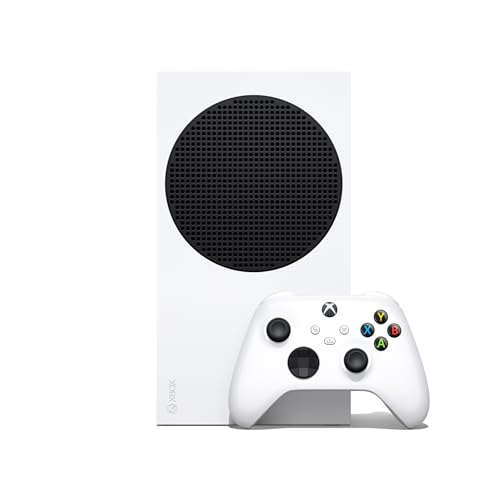
Xbox Series S
The Xbox Series S is the compact pick for a second room, a smaller television, or a first step into the current generation. It is the smallest Xbox ever made, it runs the same current-generation games as its bigger sibling, and it supports up to 120 FPS on compatible titles. The all-digital design keeps the footprint tiny, and the 512GB SSD loads games quickly. It fits neatly on a desk or a bedroom shelf where a full-size console would dominate the room, and it pairs well with a household that already has a main console in the living room.
Specs
- 512GB custom NVMe SSD
- Up to 120 FPS gameplay
- 1440p gaming resolution
- 4K streaming media playback
- Xbox Wireless Controller included
- High-speed HDMI cable included
- All-digital design with no disc drive
Best for: A bedroom, office, or second television where a compact console matters more than a disc drive.
Watch out for: The 512GB drive fills quickly with large games, so check the storage expansion card option before buying.
Nintendo Switch 2 System
The Nintendo Switch 2 is the only console here that moves between the television and your hands, and it is the pick for players who game in short sessions around the house. Its 7.9-inch 1080p touchscreen supports HDR and frame rates up to 120 fps in handheld play, and the dock supports up to 4K resolution and frame rates up to 120 fps on a compatible television. The magnetic Joy-Con 2 controllers snap into place, and one can be used as a mouse in compatible games. It also plays Nintendo Switch games, so an existing collection carries over.
Specs
- 7.9-inch 1080p LCD touchscreen with HDR
- Up to 120 fps in handheld play
- Dock supports up to 4K resolution and up to 120 fps
- 256GB internal storage, expandable with microSD Express cards
- Joy-Con 2 controllers with magnetic connectors
- Built-in microphone and GameChat support
- Plays physical and digital Nintendo Switch games
Best for: Players who switch between handheld sessions and television play in the same day.
Watch out for: The 256GB of internal storage is the smallest in this guide, so a microSD Express card is worth planning for early.
Which One Fits Your Situation
You own a 120Hz television and a shelf of PlayStation discs
Pick the PlayStation 5 Disc Edition Console (slim). The disc drive keeps your existing collection playable, the 1TB SSD holds a good rotation, and the 120Hz output matches the television you already own. It is the least disruptive upgrade in this guide, because nothing about how you buy or store games has to change.
You want the strongest living-room setup for fast games
Pick the PlayStation 5 Pro Console. The 2TB of storage means a large library stays installed, and the extra headroom keeps frame rates steady in the games where smoothness matters most. It is the right call when the television is large, the games are demanding, and deleting titles to make room has grown tiresome.
You need a second console for a smaller room
Pick the Xbox Series S. Its compact size suits a bedroom or office shelf, it runs the same current-generation games as the larger Xbox, and its 120 FPS support keeps fast games smooth on a smaller screen. The all-digital design is a fair trade when the main console already handles discs in the living room.
You play in short sessions all around the house
Pick the Nintendo Switch 2 System. Handheld play on the couch, tabletop play at the kitchen table, and docked play on the television all come from one console. The 120 fps handheld screen makes quick sessions feel smooth, and the Nintendo library is the main reason to choose it over a second television-only box.
Common Mistakes
- Buying a 120Hz console for a television that only accepts a 60Hz signal, so the faster output never appears.
- Using an older HDMI cable or the wrong HDMI port, which can cap the signal below 120Hz even on a capable television.
- Choosing an all-digital console while owning a shelf of discs that it cannot play.
- Underestimating storage: a 512GB or 256GB drive fills after only a few large games.
- Assuming every game runs at 120 frames per second, when only supported titles do, and the rest run at their own frame rate.
Frequently Asked Questions
Do I need a special television for 120Hz output?
Yes, the television needs an HDMI 2.1 port and a 120Hz panel, plus a game mode that keeps both active. Without those, the console still plays normally, but the picture stays at 60Hz. Check the television manual for the exact port and settings before choosing a console for its 120Hz output.
Does 120Hz output work in every game?
No, only games built with a higher frame rate mode use it. Many games run at 30 or 60 frames per second by design, and a 120Hz mode is usually an option inside the game settings. The console enables the output, but each game decides whether to use it.
Can the Nintendo Switch 2 output 120Hz to a television?
Yes, the dock supports frame rates up to 120 fps when the resolution is set to 1080p or 1440p on a compatible television. At 4K resolution the frame rate is fixed to a maximum of 60 fps, so the 120Hz television output applies at the lower resolutions.
Which console here has the most storage?
The PlayStation 5 Pro Console has the most built-in storage at 2TB. The PlayStation 5 slim and the Xbox Series X follow with 1TB each, the Xbox Series S has 512GB, and the Nintendo Switch 2 has 256GB. All five can be expanded with their own storage options.