Our Short List of 3
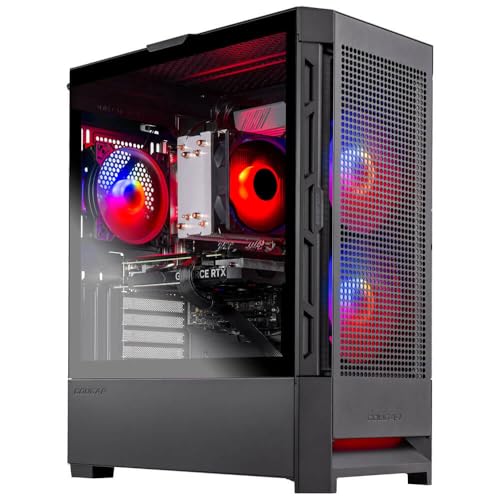
- Best for: first-time buyers who want a balanced 1080p and 1440p machine with roomy storage.
- Processor: Intel Core i5 13400F 2.5 GHz (4.6GHz Max Boost)
- Graphics: NVIDIA GeForce RTX 4060 8GB GDDR6X
- Memory: 16GB DDR4 RAM 3200
- Storage: 1TB NVMe SSD

- Best for: buyers who want a current AMD platform they can upgrade over time.
- Processor: AMD Ryzen 5 7600, 6-core 12-thread
- Graphics: NVIDIA GeForce RTX 4060 8GB
- Memory: 16GB DDR5 5200 MHz
- Storage: 500GB NVMe SSD
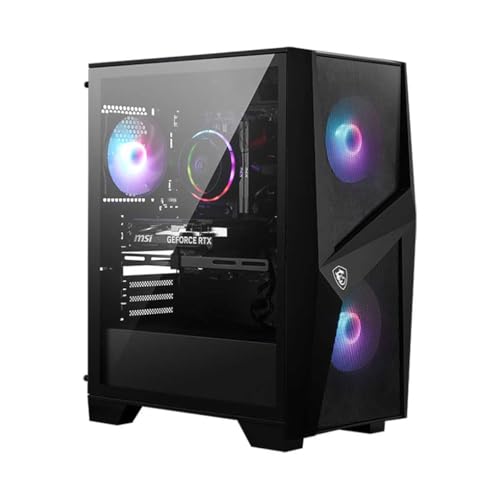
- Best for: buyers who want the newest graphics generation in a straightforward tower.
- Processor: Intel Core i5-14400F 2.5GHz
- Graphics: NVIDIA GeForce RTX 5060 8GB
- Memory: 16GB RAM
- Storage: 1TB SSD
All 3 Picks at a Glance
| Product | Specs | Action |
|---|---|---|
| Skytech Gaming Nebula |
| Check price on Amazon |
| iBUYPOWER SlateMesh |
| Check price on Amazon |
| MSI Codex R2 |
| Check price on Amazon |
Key takeaways
- Compare four ready-to-run gaming PCs for 1080p and 1440p play, with RTX 4060 and RTX 5060 graphics, fast memory, roomy SSDs, and Wi-Fi built in.
Buying a gaming PC means choosing between a machine that runs today’s games well and one that still runs next year’s releases without a rebuild. The graphics card sets the ceiling for frame rates and detail settings, while the processor, memory, and storage decide how smoothly everything else runs alongside the game. A weak link in any of those four parts drags the whole system down, so the smartest way to shop is to compare complete configurations rather than chasing a single headline component.
This guide is written for first-time buyers who want a ready-to-run desktop, for players moving from a console or a laptop, and for households sharing one machine between gaming, schoolwork, and streaming. Every system below was picked from the configuration named on its Amazon product page, using the processor, graphics card, memory, and storage printed in the listing title and specification table.
Quick Picks
As an Amazon Associate we earn from qualifying purchases
| Product | Best for | Key spec from title |
|---|---|---|
| Skytech Gaming Nebula | A balanced first tower with roomy storage | NVIDIA RTX 4060 8GB GDDR6X |
| CyberPowerPC Gamer Xtreme VR | A showpiece desk tower on DDR5 memory | NVIDIA GeForce RTX 4060 8GB |
| iBUYPOWER SlateMesh | An upgrade-friendly AMD build for the long term | NVIDIA GeForce RTX 4060 8GB |
| MSI Codex R2 | The newest graphics card in a simple tower | NVIDIA GeForce RTX 5060 8GB |
How to Choose
Match the graphics card to your monitor
Start with the screen the PC will drive, because the graphics card does most of the work in games and its memory sets a hard limit on detail settings. An 8GB card such as the RTX 4060 or RTX 5060 handles 1080p at high settings and 1440p at medium to high settings in most current titles, while older cards with less memory stutter when textures fill the frame buffer. If your monitor runs at 144Hz or higher, the card also needs enough headroom to push frames that fast, so pair a high-refresh display with the strongest card in your shortlist rather than the weakest one that technically meets the minimum requirements.
Give memory and storage room to grow
Sixteen gigabytes of memory is the floor for a gaming PC in 2026, because Windows, a browser, a voice chat app, and a modern game together use more than 8GB before a single texture loads. DDR5 memory also leaves a clearer upgrade path than DDR4 on current AMD platforms, so note which generation a listing names before ordering. Storage matters just as much: a 500GB drive holds the operating system and only a handful of large games, while a 1TB drive gives a growing library room to breathe. Check whether the drive is an NVMe SSD, since that decides how quickly games load and levels stream in.
Weigh the processor by generation and cores
The processor matters most in open-world games, strategy titles, and anything running alongside the game, such as streaming software or a video call. A current-generation six-core or ten-core chip keeps frame times steady when the action gets busy, while an older four-core chip becomes the bottleneck even when the graphics card has power to spare. Pay attention to the model number rather than the brand badge: an Intel Core i5-14400F is a newer design than an i5-13400F, and an AMD Ryzen 5 7600 sits on the newer AM5 platform. Match the processor generation to the graphics card so neither part waits on the other.
Look past the lighting at cooling and ports
RGB fans and a glass side panel look good in photos, but airflow, fan count, and the power supply decide whether a PC stays quiet and stable during long sessions. A mesh front panel and several intake fans move more air than a sealed glass front, and a Gold-rated power supply wastes less energy as heat. Count the ports on the back before ordering: enough USB ports for a keyboard, mouse, headset, and controller, plus a wired network socket if Wi-Fi is unreliable in your room. Confirm the monitor cable goes into the graphics card, since the motherboard sockets stay dark on processors with no integrated graphics.
The 4 Best Options
Skytech Gaming Nebula
- Best for: first-time buyers who want a balanced 1080p and 1440p machine with roomy storage.
- Processor: Intel Core i5 13400F 2.5 GHz (4.6GHz Max Boost)
- Graphics: NVIDIA GeForce RTX 4060 8GB GDDR6X
- Memory: 16GB DDR4 RAM 3200
- Storage: 1TB NVMe SSD
first-time buyers who want a balanced 1080p and 1440p machine with roomy storage.
the graphics card brand may vary between shipments, so confirm the exact card on the listing before ordering.
The Nebula is the most balanced machine in this guide, pairing a 10-core Intel processor with an RTX 4060 and a full terabyte of fast storage. That combination covers 1080p at high settings and 1440p at medium to high settings in most current games, and the 600W Gold power supply leaves headroom for later upgrades. Sixteen gigabytes of DDR4 memory with a heat spreader keeps multitasking smooth, and the built-in Wi-Fi means the tower works in any room without a cable run. It arrives with Windows 11 Home installed, so setup is a matter of plugging in a monitor, keyboard, and mouse.
Watch out for: the graphics card brand may vary between shipments, so confirm the exact card on the listing before ordering.
CyberPowerPC Gamer Xtreme VR
CyberPowerPC’s Gamer Xtreme VR puts the same RTX 4060 graphics card on a newer memory platform, pairing it with 16GB of DDR5 and a 1TB PCIe Gen4 SSD. The Gen4 drive loads games and levels faster than older drives, and DDR5 gives the system a longer useful life before a memory upgrade becomes necessary. Wi-Fi is built in, Windows 11 Home comes preinstalled, and the tempered glass side panel with custom RGB lighting suits a desk setup where the tower stays visible. It is a strong pick for players who want modern parts throughout rather than one standout component.
Specs
- Processor: Intel Core i5-13400F 2.5GHz
- Graphics: NVIDIA GeForce RTX 4060 8GB
- Memory: 16GB DDR5
- Storage: 1TB PCIe Gen4 SSD
- Connectivity: WiFi Ready
- Operating system: Windows 11 Home
- Model: GXiVR8060A24
Best for: players who want DDR5 memory and a Gen4 SSD in a showpiece tower.
Watch out for: CyberPowerPC reuses model names across configurations, so confirm the i5-13400F and RTX 4060 pairing on the listing before ordering.
iBUYPOWER SlateMesh
- Best for: buyers who want a current AMD platform they can upgrade over time.
- Processor: AMD Ryzen 5 7600, 6-core 12-thread
- Graphics: NVIDIA GeForce RTX 4060 8GB
- Memory: 16GB DDR5 5200 MHz
- Storage: 500GB NVMe SSD
buyers who want a current AMD platform they can upgrade over time.
the 500GB drive fills quickly with large games, so budget for an extra SSD early.
The SlateMesh is the upgrade-minded pick in this lineup, built on AMD’s AM5 platform with a Ryzen 5 7600 processor and 16GB of DDR5 memory running at 5200 MHz. That platform lets a stronger Ryzen processor drop into the same motherboard later, which matters for buyers who plan to keep the tower for years. The RTX 4060 handles 1080p at high settings, the mesh front and tempered glass side keep airflow moving, and a keyboard and mouse come in the box. Its 500GB drive is the one compromise, so plan on adding storage as the game library grows.
Watch out for: the 500GB drive fills quickly with large games, so budget for an extra SSD early.
MSI Codex R2
- Best for: buyers who want the newest graphics generation in a straightforward tower.
- Processor: Intel Core i5-14400F 2.5GHz
- Graphics: NVIDIA GeForce RTX 5060 8GB
- Memory: 16GB RAM
- Storage: 1TB SSD
buyers who want the newest graphics generation in a straightforward tower.
MSI sells several Codex R2 configurations under similar model numbers, so confirm this exact configuration on the listing before ordering.
The Codex R2 carries the newest graphics card in this guide, pairing an RTX 5060 with a 14th-generation Intel Core i5-14400F and 16GB of memory. The 5060 brings the current generation of NVIDIA features to 1080p and 1440p play, and the 1TB SSD leaves room for a solid library without an immediate upgrade. Windows 11 Home comes preinstalled, and the tower’s ARGB fan cooling keeps the system looking sharp on a desk while moving air through the case. It suits buyers who want the latest card generation without stepping up to a larger machine or a more complicated setup.
Watch out for: MSI sells several Codex R2 configurations under similar model numbers, so confirm this exact configuration on the listing before ordering.
Which One Fits Your Situation
Buying a first gaming PC for the family
Choose the Skytech Nebula. Its 1TB drive holds games for several players without constant uninstalling, the Gold power supply runs quietly, and the balanced parts list means nobody has to learn about upgrades on day one. Wi-Fi is built in, so the tower works in a bedroom or living room without running a cable through the house.
Playing fast esports games at high refresh rates
Choose the iBUYPOWER SlateMesh. The Ryzen 5 7600 keeps frame times steady in competitive titles, the RTX 4060 pushes high frame rates at 1080p, and DDR5 memory leaves the system ready for a processor upgrade later. Add storage when the library grows, but the core parts are already right for ranked play.
Wanting the newest graphics card for 1440p
Choose the MSI Codex R2. Its RTX 5060 is the most recent graphics card in this guide, and the i5-14400F is the newest processor here, so the pair handles 1440p at medium to high settings in current games. The 1TB SSD means the library has room to grow, and the preinstalled Windows 11 Home keeps setup short.
Sharing one PC between gaming, school, and streaming
Choose the CyberPowerPC Gamer Xtreme VR. Its DDR5 memory and Gen4 SSD keep the system responsive when a game, a browser, and a voice app run at once, and the 1TB drive holds school files alongside a game library. The tempered glass panel and RGB lighting make it a natural fit for a visible desk setup.
Common Mistakes
- Buying the graphics card first and ignoring memory: 8GB of RAM chokes a modern game even beside a strong card, so confirm 16GB before ordering.
- Picking a 500GB drive and assuming it is enough: a handful of large games fills it, so plan for a 1TB drive or an extra SSD from the start.
- Plugging the monitor into the motherboard instead of the graphics card: processors with an F suffix have no integrated graphics, so those sockets stay dark.
- Judging a PC by its lighting: RGB fans say nothing about airflow, so check the front panel design and fan count instead.
- Ordering by model name alone: one model number can cover several configurations, so confirm the exact processor, graphics card, memory, and storage on the listing.
Frequently Asked Questions
How much RAM does a gaming PC need in 2026?
Sixteen gigabytes is the practical minimum for a gaming PC in 2026. Windows, a browser, and a voice app already use several gigabytes before a game loads, and modern titles keep growing in memory demand. Eight gigabytes leads to stuttering and slowdowns, so treat 16GB as the floor and consider 32GB if streaming or content creation shares the machine.
Is a prebuilt gaming PC better than building one?
A prebuilt suits buyers who want a working machine without sourcing parts, assembling hardware, and troubleshooting a first boot. The builder handles assembly, cable routing, and Windows installation, and the system arrives with a single point of support. Building yourself offers more control over every part, but it takes time, tools, and patience that not every buyer wants to spend.
Can these PCs run games at 1440p?
Yes, with the right expectations. The RTX 4060 and RTX 5060 systems in this guide run most current games at 1440p on medium to high settings, and older or less demanding titles reach high settings comfortably. Very demanding new releases may need lowered settings or upscaling to stay smooth, so check the settings each game needs before judging the hardware.
What should I check on the listing before ordering?
Confirm the exact processor model, graphics card, memory size and generation, and storage size printed in the title, since one model number can cover several configurations. Check that Windows is included, note whether Wi-Fi is built in, and read the included accessories list so a missing keyboard or mouse does not surprise you on delivery day.