Key takeaways
- Find the best 12 button MMO gaming mouse for raids, rotations, and hotbar-heavy play, with five verified picks compared on buttons, sensor, and comfort.
A 12 button MMO gaming mouse puts a full action bar under your thumb. Instead of stretching across the keyboard for every ability, potion, and cooldown, you map the skills you use most to a grid of twelve thumb buttons and keep your left hand free for movement. That layout matters most in games built around long rotations and crowded hotbars, such as World of Warcraft, Final Fantasy XIV, and The Elder Scrolls Online, where a mistimed key can wipe a raid group.


The mice in this guide all share the same defining feature: a twelve-button side panel designed for MMO play. They differ in how that panel works, how the mouse connects, how heavy it feels, and how many extra buttons surround the grid. We compared wireless and wired options, premium flagships and budget-friendly picks, so you can match a mouse to the way you actually play.
As an Amazon Associate, we earn from qualifying purchases.
Quick Picks
Our Short List of 3
- Best for: Players who want one mouse for every genre

- Best for: Players who want the side panel to fit their thumb exactly
All 5 Picks at a Glance
| Product | Specs | Action |
|---|---|---|
| 1. Razer Naga V2 Pro |
| Check price on Amazon |
| 2. Logitech G600 |
| Check price on Amazon |
| 3. Corsair Scimitar RGB Elite |
| Check price on Amazon |
 4. Redragon M913 Impact Elite |
| Check price on Amazon |
 5. SteelSeries Aerox 9 Wireless |
| Check price on Amazon |
How We Chose
Every mouse below was checked against the same rules. First, it must have a genuine twelve-button thumb panel, not a smaller side cluster dressed up as an MMO layout. Second, it must be a current listing on Amazon US. Third, it must be a mouse built for MMO or MOBA play, with programmable buttons and software or onboard memory for binding abilities. We excluded general-purpose gaming mice, office mice, and mice whose side panels hold fewer than twelve buttons.
We also weighed practical differences that show up over hundreds of hours of play. Button layout matters: a flat grid suits players who memorize positions by touch, while a contoured or adjustable panel suits players whose thumbs cramp on a fixed grid. Weight matters too, because a heavy mouse feels stable during slow rotations but tiring during fast action. Connectivity matters for desk setup, and battery life matters for anyone who hates charging mid-raid.
1. Razer Naga V2 Pro
Players who want one mouse for every genre
The Razer Naga V2 Pro is the most flexible mouse in this guide, and the reason is simple: its side panel swaps. Three magnetic plates snap on and off in seconds, giving you a twelve-button grid for MMO raids, a six-button panel for MOBAs and action games, and a two-button panel for shooters and everyday work.
With the twelve-button plate attached, the mouse offers 19+1 programmable buttons in total, counting the scroll wheel and the profile button underneath. The Focus Pro 30K optical sensor tracks precisely, and third-generation optical switches are rated for 90 million clicks. The HyperScroll Pro wheel can switch between smooth free-spin scrolling and tactile stepped scrolling, which is useful for zooming through long inventory lists or cycling weapons.
Battery life is rated at up to 150 hours over 2.4GHz wireless and up to 300 hours over Bluetooth, so charging is a rare chore rather than a nightly one. The mouse weighs 134 grams with the twelve-button plate attached, which is on the heavier side, but that weight gives it a planted, stable feel during slow rotations. It is right-handed, with an ergonomic shape that supports the palm during long sessions.
Key specs:
– Swappable side plates with 12, 6, and 2 buttons
– Focus Pro 30K optical sensor
– 19+1 programmable buttons with the twelve-button plate
– HyperScroll Pro wheel with free-spin and tactile modes
– Wireless over 2.4GHz and Bluetooth, plus wired use
– Battery life up to 150 hours (2.4GHz) or 300 hours (Bluetooth)
– Weight: 134 grams with the twelve-button plate
Pros:
– Three swappable side plates cover MMO, MOBA, and FPS play in one mouse
– Long battery life means charging rarely interrupts a session
– Precise sensor and durable optical switches built for heavy use
Cons:
– Heavier than the other wireless picks in this guide
– Premium design costs more than simpler wired alternatives
– Full customization depends on Razer Synapse software
Why it fits: The twelve-button plate is the classic MMO grid, and the swappable design means the mouse stays useful when you switch games. If you want one mouse that adapts to your whole library, this is the pick.
2. Logitech G600
Long MMO sessions on a budget
The Logitech G600 has been a fixture of MMO gaming for years, and its staying power comes from a layout that was designed with MMO developers in mind. Its twelve thumb buttons sit in a dual-dish panel: two groups of six buttons, each group slightly dished so your thumb can tell them apart by feel alone. That shape reduces misclicks during fast rotations, which is exactly what you want when an ability needs to land on the first press.
In total the G600 offers 20 programmable buttons, including the twelve thumb buttons, three primary buttons, a clickable tilting scroll wheel, and DPI and profile switching controls. RGB backlighting lets you color-code the thumb panel, and the wired connection means there is no battery to charge and no wireless signal to drop mid-fight.
The G600 is a wired mouse, so it suits players who keep a fixed desk setup and do not mind a cable. Its shape is broad and right-handed, built to fill the palm during long sessions.
Key specs:
– 12 thumb buttons in a dual-dish panel
– 20 programmable buttons in total
– RGB backlit thumb panel
– Wired USB connection
– Model number 910-002864
Pros:
– Dual-dish thumb panel helps you find buttons by touch without looking
– Twenty programmable buttons cover full rotations and utility keys
– Wired connection means no charging and no wireless dropouts
Cons:
– Wired only, so it is less suited to a cable-free desk
– Older design without the swappable panels or sensors of newer flagships
– Large, broad shape may not suit smaller hands
Why it fits: Twelve thumb buttons arranged for MMO play, a proven layout, and a budget-friendly position in the category. The G600 is the classic entry point into twelve-button mice.
3. Corsair Scimitar RGB Elite
- Best for: Players who want the side panel to fit their thumb exactly
Players who want the side panel to fit their thumb exactly
The Corsair Scimitar RGB Elite solves a problem every MMO player knows: no two thumbs are the same length, and a fixed button grid never sits quite right for everyone. Its patented Key Slider system lets you slide the entire twelve-button side panel forward or back by 8 millimeters, so you can position the grid where your thumb naturally rests. Once it fits, you stop reaching for buttons and start hitting them on instinct.
The mouse carries 17 programmable buttons in total, with the twelve mechanical side buttons at the center of the layout. Its custom PixArt PMW3391 optical sensor reaches 18,000 DPI and adjusts in 1 DPI steps, giving fine control over sensitivity. Omron switches rated for 50 million clicks sit under the main buttons, and onboard profile storage lets you carry your bindings with the mouse. Corsair iCUE software handles macros, lighting, and surface calibration, with four-zone RGB lighting across the body.
This is a wired mouse, so it draws power over its braided cable and never needs charging. The wired connection also keeps latency consistent, which matters when abilities must fire the instant you press.
Key specs:
– 12 mechanical side buttons on an adjustable Key Slider panel
– 17 programmable buttons in total
– PixArt PMW3391 optical sensor up to 18,000 DPI
– Omron switches rated for 50 million clicks
– Corsair iCUE software with four-zone RGB lighting
– Onboard profile storage
– Wired USB connection
Pros:
– Sliding side panel adjusts the button grid to your thumb
– Mechanical side buttons give a crisp, consistent press
– Onboard profiles keep your bindings when you switch computers
Cons:
– Wired only, with no wireless option
– iCUE software is required for full customization
– Heavier feature set may be more than casual players need
Why it fits: Twelve mechanical side buttons plus a panel that moves to meet your thumb. For players who have struggled with fixed grids, the Scimitar RGB Elite is the most ergonomic twelve-button option here.
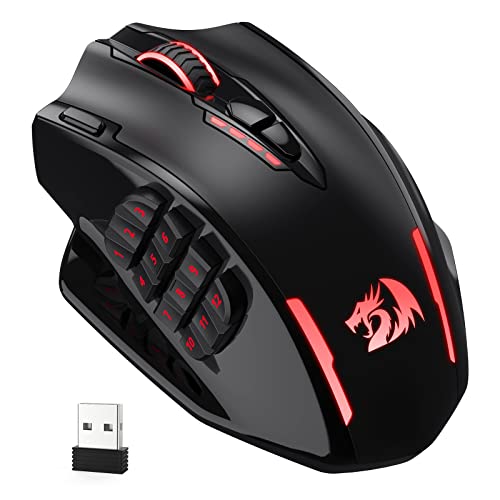
4. Redragon M913 Impact Elite
- Best for: Wireless MMO play without a premium price
Wireless MMO play without a premium price
The Redragon M913 Impact Elite is the first wireless MMO mouse Redragon made with twelve programmable side buttons, and it brings wireless freedom to a price range where wired mice usually dominate. It runs in 2.4GHz wireless mode or wired over USB-C, so you can play wirelessly and plug in to charge without stopping. A full charge takes about four hours over USB-C, and the battery is rated for about 45 hours of use, stretching to around 80 hours in ECO mode.
The mouse offers 16 programmable buttons in total, with the twelve side buttons forming the MMO grid. Its Pixart 3335 optical sensor reaches 16,000 DPI, and a 1000 Hz polling rate with 40G acceleration keeps tracking responsive in either mode. At 132 grams it is a substantial mouse, similar in heft to the Naga V2 Pro, which suits players who like a solid, planted feel. RGB lighting and Windows software support round out the package.
The M913 is the pick for players who want to cut the cable but do not want to pay flagship money to do it. It gives up some sensor and switch refinement compared with the premium options, but it keeps the core of the MMO experience: twelve side buttons, wireless play, and enough battery for a week of evenings.
Key specs:
– 12 programmable side buttons
– 16 programmable buttons in total
– Pixart 3335 optical sensor up to 16,000 DPI
– 2.4GHz wireless and wired USB-C modes
– Battery life about 45 hours, up to around 80 hours in ECO mode
– 1000 Hz polling rate
– Weight: 132 grams
Pros:
– Wireless and wired modes at a budget-friendly position
– Twelve side buttons with a straightforward, proven layout
– Long ECO-mode battery life for extended play
Cons:
– Heavier than the lightweight wireless pick in this guide
– Sensor and switches are a step below premium flagships
– Software support is Windows-focused
Why it fits: Twelve side buttons, wireless freedom, and a price that undercuts the premium wireless mice. The M913 is the value route to a wireless twelve-button setup.
5. SteelSeries Aerox 9 Wireless
- Best for: Lightweight wireless play with long battery life
Lightweight wireless play with long battery life
The SteelSeries Aerox 9 Wireless is the lightest mouse in this guide at 89 grams, and that weight changes how a long session feels. Where heavier MMO mice anchor your hand, the Aerox 9 stays nimble, which suits players who move the mouse constantly or who find heavy mice tiring over a three-hour raid night. Its holey shell keeps the weight down while AquaBarrier protection guards against dust, dirt, and splashes.
The mouse offers 18 programmable buttons, with a twelve-button side panel at the core of the layout. Its TrueMove Air optical sensor reaches 18,000 DPI, and the battery lasts up to 180 hours over 2.4GHz or Bluetooth wireless. That battery life is the longest in this guide, so charging becomes a rare event rather than a routine. Three zones of RGB lighting work with SteelSeries PrismSync to match the rest of your setup.
The Aerox 9 is the pick for players who want the MMO grid without the wrist fatigue. It trades some of the button-count and customization depth of the heavier flagships for speed, lightness, and battery life.
Key specs:
– 12-button side panel
– 18 programmable buttons in total
– TrueMove Air optical sensor up to 18,000 DPI
– Bluetooth and 2.4GHz wireless
– Battery life up to 180 hours
– Weight: 89 grams
– AquaBarrier dust and splash protection
Pros:
– Lightest mouse in this guide, reducing fatigue over long sessions
– Longest battery life here, up to 180 hours
– Water-resistant design adds durability for everyday use
Cons:
– Fewer total programmable buttons than the Naga V2 Pro or G600
– Holey shell design is not to every player’s taste
– Premium lightweight design costs more than budget wired options
Why it fits: Twelve side buttons in an 89-gram wireless body with 180-hour battery life. If weight and wireless freedom matter most, the Aerox 9 Wireless is the pick.
Buying Guide: What to Look For in a 12 Button MMO Mouse
Button layout and feel. Twelve buttons in a grid is the standard, but the shape of the grid varies. Flat grids reward memorization, dished panels help you distinguish buttons by touch, and sliding panels let you fit the grid to your thumb.
Total programmable buttons. The side panel is the headline, but the total button count tells you how much of your rotation you can move to the mouse. The picks here range from 16 to 20 programmable buttons. More buttons suit players with long rotations; fewer suit players who keep movement keys on the keyboard.
Wired versus wireless. Wired mice never need charging and keep latency consistent, which suits a fixed desk setup. Wireless mice free your desk and travel better, but need charging. The wireless picks here range from about 45 hours to 180 hours per charge, so check the rating before you buy.
Weight. MMO mice are heavier than competitive FPS mice because the side panel adds bulk. The picks here run from 89 grams to 134 grams. Lighter mice reduce fatigue over long sessions; heavier mice feel more stable during slow, deliberate play.
Sensor and switches. A modern optical sensor with adjustable DPI and a high polling rate keeps tracking smooth, while durable switches survive millions of clicks. These matter most for players who use the same mouse for fast-paced games as well as MMOs.
Software and profiles. Binding abilities is only half the job; you also need to save those bindings. Look for software that supports per-game profiles and onboard memory, so your setup follows you between computers.
FAQ
Do I need a 12 button mouse to play MMOs?
No. Many players clear the hardest content with a standard mouse and keyboard bindings. A twelve-button mouse helps if your rotation is long, your hotbar is crowded, or you find keyboard reaching uncomfortable. It is a comfort and speed upgrade, not a requirement.
Are 12 button mice good for games other than MMOs?
Yes, with limits. The thumb grid works well in MOBAs, action RPGs, and strategy games where you trigger many abilities. In fast shooters, the grid can feel crowded, which is why the Naga V2 Pro includes smaller swap plates for those games.
Wired or wireless for MMO gaming?
Both work well. Wired mice suit a fixed desk and never need charging. Wireless mice suit players who want a clean desk or who travel with their setup. Modern wireless mice in this guide have low latency and long battery life, so the choice comes down to your setup rather than performance.
How long does it take to learn a 12 button mouse?
Most players need one to two weeks of regular play to build muscle memory for the grid. Start by binding your most-used abilities to the easiest buttons to reach, then add more as the layout becomes familiar.
Can left-handed players use these mice?
The mice in this guide are right-handed designs, which is the standard for twelve-button MMO mice. Left-handed players looking for a similar layout will find very few options in this category, so checking the handedness before buying is important.
Conclusion
A 12 button MMO gaming mouse earns its place by moving your rotation to your thumb. The Razer Naga V2 Pro is the most versatile pick, with swappable plates that cover every genre. The Logitech G600 is the proven budget classic, and the Corsair Scimitar RGB Elite fits thumbs that fixed grids never suited. The Redragon M913 Impact Elite brings wireless play to a lower price, while the SteelSeries Aerox 9 Wireless pairs the lightest body here with the longest battery life. Pick the layout that fits your hand, the connection that fits your desk, and the weight your wrist will thank you for after a long night of raiding.
Verified: Nov 25, 2026 — ASINs checked on Amazon.