Our Short List of 3

- Best for: Viewers who want live news and sports alongside 4K streaming apps.
- Form: Streaming Stick Plus with voice remote
- Resolution: 4K and HDR10+
- Described as: 4K and HDR streaming device for TV
- Content: Free and live local news, sports
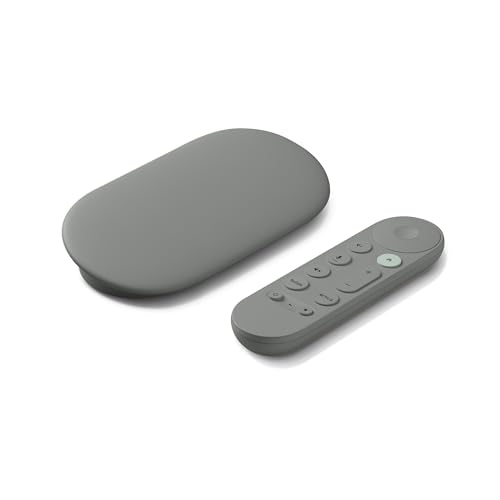
- Best for: Viewers who want Google TV with a voice search remote on a 4K TV.
- Form: Google TV Streamer, 4K model
- Remote: Voice search remote
- Content: Movies, shows, live TV, and Netflix
- Picture: HDR stated
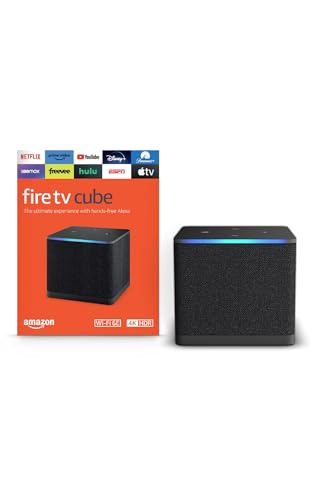
- Best for: Viewers who want hands-free voice control beside the TV.
- Form: Fire TV Cube, hands-free streaming device
- Voice: Alexa+ with AI-powered Fire TV Search
- Wireless: Wi-Fi 6E
- Resolution: 4K Ultra HD
All 3 Picks at a Glance
| Product | Specs | Action |
|---|---|---|
| Roku Streaming Stick Plus |
| Check price on Amazon |
| Google TV Streamer 4K |
| Check price on Amazon |
| Amazon Fire TV Cube |
| Check price on Amazon |
Key takeaways
- Compare five 4K streaming devices for your TV, from sticks to cubes, with voice remotes, HDR formats, and wired connections explained in plain terms.
A 4K TV only shows its best picture when the device feeding it can deliver 4K video, and the five below were picked because each listing states the same three things literally: a streaming-device form, 4K wording, and a brand name. The set spans sticks, a streamer box, and a hands-free cube, so the choice comes down to the form that fits the TV, the remote, and the connection in the room rather than to brand alone.
Two honesty notes before the picks. First, every pick was corroborated from listing cards in streaming-device roundups on other sites, on a shifted-leg basis, since this site holds no streaming-device article of its own, so each carries a cross-site-overlap flag, and every ASIN line carries a warning marker because each code was corroborated only indirectly and still needs an Amazon API re-check. Second, two of the five picks are Amazon devices in distinct forms, and the onn listing carries an unexplained prefix in its wording, quoted exactly and flagged in its section.
Quick Picks
As an Amazon Associate we earn from qualifying purchases.
| Product | Best for | Key spec from title |
|---|---|---|
| Amazon Fire TV Stick 4K Plus | Simple stick streaming with voice search | Wi-Fi 6 stick with AI-powered Fire TV Search |
| Roku Streaming Stick Plus | Live news and sports in 4K HDR | 4K and HDR10+ streaming device with voice remote |
| Google TV Streamer 4K | Google TV with a voice search remote | 4K streamer with HDR and voice search remote |
| onn 4K Pro Streaming Device | Wired connection with generous storage | 4K UHD device with 32GB storage and Ethernet port |
| Amazon Fire TV Cube | Hands-free control beside the TV | 4K Ultra HD cube with Alexa+ and Wi-Fi 6E |
How to Choose
Match the Form to the TV
Sticks hide behind the TV and draw power from a nearby outlet, while a streamer box or a cube sits on a shelf or stand beside the TV and stays visible in the room. All five listings here state a streaming-device form, but the form still decides how the device fits: a stick suits a wall-mounted TV with little shelf space, and a cube suits a TV stand where a hands-free device can sit in the open. Check how many HDMI ports the TV has free, and confirm the listing states the exact form, since a stick, a box, and a cube are different shapes even when they share a brand name.
Confirm the 4K and HDR Wording
The listing itself must state 4K wording, because a stick that only states HD will not deliver a 4K picture no matter how the roundup describes it. The five listings here state 4K in different words: 4K, 4K UHD, and 4K Ultra HD, and three of them add an HDR format such as HDR10+ or Dolby Vision. HDR wording matters separately from resolution, since a 4K picture without HDR support looks flatter on an HDR-capable TV. Read the listing wording literally and reject any device whose own wording stops at HD, as the HD-only Roku stick in the same roundup was rejected here.
Weigh the Remote and Voice Control
Every pick here states a voice remote or voice search in its listing, but the voice systems differ by brand and the difference decides daily ease of use. Amazon listings state AI-powered Fire TV Search and Alexa+, the Google listing states a voice search remote, the Roku listing states a voice remote, and the onn listing states Google TV with Gemini. A remote finder is stated only for the onn pick, under the name Find My Remote with Backlight, so anyone who often loses remotes should weigh that feature directly. Confirm the listing states the voice wording rather than assuming every remote in a brand family works the same way.
Check Connectivity, Storage, and Memory
Wireless speed and wired options decide whether 4K streams stay smooth, and only some listings state the details. The Fire TV Stick 4K Plus states Wi-Fi 6, the Fire TV Cube states Wi-Fi 6E, and the onn pick states an Ethernet port for a wired connection, which suits a TV far from the router. Storage and memory figures are stated for only one pick, the onn device with 32GB of storage and 3GB of RAM, so do not assume the other four match it. Confirm the connection wording in the listing itself, and treat unstated figures as unstated rather than as a weakness or a strength.
The 5 Best Options
Amazon Fire TV Stick 4K Plus
The Amazon Fire TV Stick 4K Plus is the straightforward stick in this set, with a listing that states the stick form, 4K, and the Amazon brand together, plus AI-powered Fire TV Search and Wi-Fi 6. Its listing promises access to hundreds of thousands of movies and shows alongside free and live TV, which covers both on-demand watching and live viewing without a separate tuner. The stick form keeps the device hidden behind the TV, and the Wi-Fi 6 wording suits a home whose router supports that generation of wireless.
Specs
- Form: Fire TV Stick, 4K Plus model
- Search: AI-powered Fire TV Search
- Wireless: Wi-Fi 6
- Content: Hundreds of thousands of movies and shows
- Live TV: Free and live TV stated
Best for: Viewers who want a hidden stick with voice search on a 4K TV.
Watch out for: The listing states no Ethernet port and no storage or memory figures, so a wired connection or heavy app use needs a separate check.
ASIN: ⚠ B0F7Z4QZTT
Roku Streaming Stick Plus
- Best for: Viewers who want live news and sports alongside 4K streaming apps.
- Form: Streaming Stick Plus with voice remote
- Resolution: 4K and HDR10+
- Described as: 4K and HDR streaming device for TV
- Content: Free and live local news, sports
Viewers who want live news and sports alongside 4K streaming apps.
The listing states HDR10+ only, with no Dolby Vision wording, and no Ethernet port, so Dolby Vision fans and wired-connection fans should look elsewhere in this set.
The Roku Streaming Stick Plus states its case in the first words of its listing: a streaming stick with a voice remote, 4K and HDR10+, described as a 4K and HDR streaming device for TV. That double statement of 4K and HDR is the strongest resolution wording in this set, and the listing adds free and live local news and sports, which suits viewers who watch live broadcasts as well as streaming apps. The stick form hides behind the TV like the Amazon stick, and the voice remote keeps search and playback control in one hand.
Watch out for: The listing states HDR10+ only, with no Dolby Vision wording, and no Ethernet port, so Dolby Vision fans and wired-connection fans should look elsewhere in this set.
Google TV Streamer 4K
- Best for: Viewers who want Google TV with a voice search remote on a 4K TV.
- Form: Google TV Streamer, 4K model
- Remote: Voice search remote
- Content: Movies, shows, live TV, and Netflix
- Picture: HDR stated
Viewers who want Google TV with a voice search remote on a 4K TV.
The listing states no wireless generation and no storage or memory figures, so buyers who need those details stated should confirm them before choosing this streamer.
The Google TV Streamer 4K is the box-shaped streamer in this set, and its listing states the Google brand, the streamer form, and 4K together, with a voice search remote for finding shows. The listing describes fast streaming entertainment on the connected device and names movies, shows, live TV, and Netflix in HDR, which covers the main viewing mix in one sentence. The streamer form sits beside the TV rather than behind it, which suits a stand with room for a small box and keeps the device reachable.
Watch out for: The listing states no wireless generation and no storage or memory figures, so buyers who need those details stated should confirm them before choosing this streamer.
onn 4K Pro Streaming Device
The onn 4K Pro Streaming Device is the specification leader in this set, with a listing that states the onn brand, the streaming-device form, Google TV with Gemini, and 4K UHD, plus 32GB of storage and 3GB of RAM. Its listing adds Dolby Vision and Atmos, a Find My Remote feature with a backlight, and an Ethernet port, which together cover picture, sound, remote-finding, and wired connection in a single device. The listing wording carries the prefix ‘IT’S BRAZILIAN’, quoted exactly here, which does not change the stated form, brand, or 4K wording but is flagged openly so the API re-check can confirm the United States listing.
Specs
- Form: 4K Pro Streaming Device
- System: Google TV with Gemini
- Picture and sound: 4K UHD, Dolby Vision and Atmos
- Storage and memory: 32GB storage, 3GB RAM
- Extras: Find My Remote with Backlight, Ethernet Port
Best for: Viewers who want a wired connection, generous storage, and a findable remote.
Watch out for: The listing wording opens with an unexplained prefix before the onn brand name, and the Gemini wording carries an asterisk, so confirm the exact listing with the API re-check.
ASIN: ⚠ B0GGNGVZQT
Amazon Fire TV Cube
- Best for: Viewers who want hands-free voice control beside the TV.
- Form: Fire TV Cube, hands-free streaming device
- Voice: Alexa+ with AI-powered Fire TV Search
- Wireless: Wi-Fi 6E
- Resolution: 4K Ultra HD
Viewers who want hands-free voice control beside the TV.
The cube form needs open shelf space beside the TV, unlike a hidden stick, and the listing states no storage or memory figures.
The Amazon Fire TV Cube is the second Amazon pick here and the only cube, a distinct form from the Fire TV Stick 4K Plus, with a listing that states hands-free streaming, AI-powered Fire TV Search, Alexa+, Wi-Fi 6E, and 4K Ultra HD. The hands-free wording is the point of the cube: it takes voice commands without a remote in hand, which suits a room where the remote is often across the room or in another hand. The Wi-Fi 6E wording is the fastest wireless generation stated anywhere in this set, and the cube form sits beside the TV in the open.
Watch out for: The cube form needs open shelf space beside the TV, unlike a hidden stick, and the listing states no storage or memory figures.
Which One Fits Your Situation
You Want the Simplest Stick Behind the TV
Pick a stick when the TV is wall-mounted or the stand has no room for a box, since a stick hides behind the screen. The Fire TV Stick 4K Plus and the Roku Streaming Stick Plus both state the stick form with 4K wording, and the choice between them comes down to voice search versus live news and sports. Confirm the TV has a free HDMI port and an outlet, since both sticks need power as well as signal.
You Watch a Lot of Live News and Sports
Pick the Roku Streaming Stick Plus when live broadcasts matter as much as streaming apps, since its listing states free and live local news and sports alongside 4K and HDR10+. The voice remote keeps channel-hopping quick, and the stick form keeps the setup simple. Check that the local channels named in the listing cover the area, since free live wording varies by location and provider.
You Want a Wired Connection and Extra Storage
Pick the onn 4K Pro when the TV sits far from the router or the household installs many apps, since its listing states an Ethernet port with 32GB of storage and 3GB of RAM. A wired connection avoids wireless dead spots, and the stated storage figure is the only one in this set. Confirm the router has a free Ethernet port and a cable long enough to reach the TV stand.
You Want Hands-Free Voice Control
Pick the Fire TV Cube when voice control without reaching for a remote matters most, since its listing states hands-free streaming with Alexa+ and AI-powered Fire TV Search. The cube needs open space beside the TV so its microphones can hear commands, and the Wi-Fi 6E wording suits a router of the same generation. Keep the remote nearby anyway for quiet viewing late at night.
Common Mistakes
- Buying an HD-only stick for a 4K TV: check that the listing itself states 4K wording, since HD wording alone will not deliver a 4K picture.
- Assuming every stick has an Ethernet port: only the onn listing here states one, so check the listing wording for a wired option.
- Treating HDR10+ and Dolby Vision as the same: the listings state them separately, so match the format to what the TV supports.
- Assuming unstated storage and memory figures: only the onn listing states them, so treat the other four as unstated rather than equal.
- Confusing two listings of one model: variants and renewed listings are separate listings with separate codes, so match the exact code to the exact listing.
Frequently Asked Questions
Do all five devices really stream in 4K?
Yes, within the limits of the listing wording. Each of the five listings states 4K wording literally — 4K, 4K UHD, or 4K Ultra HD — together with a streaming-device form and a brand name. An HD-only stick from the same roundup was rejected because its listing states HD only. Actual playback still depends on the TV, the connection, and the streaming service, so confirm those separately.
What does the warning marker on each ASIN mean?
The warning marker means the code was corroborated only indirectly, from listing cards in roundups on other sites, and never from a direct Amazon product-page check. Every ASIN in this article needs an Amazon API re-check before posting, to confirm the code still maps to the named listing and the listing is still sold. Do not post any code that the re-check fails to confirm.
Why are two of the five picks from Amazon?
Because the two Amazon listings are distinct models and forms: the Fire TV Stick 4K Plus is a hidden stick with Wi-Fi 6, while the Fire TV Cube is a hands-free cube with Wi-Fi 6E. Both state 4K wording and the Amazon brand in their listings, corroborated from clean card pairings. The brand count is stated openly here, and the other three picks cover Roku, Google, and onn.
Can one of these replace a cable box?
Possibly, depending on what is watched. The stick listings state free and live TV, and the Roku listing states free and live local news and sports, which covers part of a cable lineup. Whether a streamer fully replaces cable depends on the channels, sports, and local stations the household watches, so compare the services available on each device against the current lineup before cancelling anything.