Key takeaways
- Compare the best modern PC cases with panoramic tempered glass, dual-chamber layouts and clean cable routing, from HYTE, NZXT and RUIX ATX mid-towers.
As an Amazon Associate we earn from qualifying purchases.
A modern PC case is no longer just a metal box that holds parts. The current generation of cases is built around showing the build as much as housing it: panoramic tempered glass panels that wrap around a corner, dual-chamber layouts that hide the power supply and cables behind the motherboard, vertical graphics card mounting on a riser cable, and front panels with USB-C as standard. If you are planning a new build, or moving an existing one into a case that looks at home on a desk rather than under it, the design language has changed enough that an older chassis can feel dated even when it still works.

This guide covers four modern PC cases sold on Amazon US. Two come from HYTE, the brand that defined the panoramic dual-chamber look with its Y60 and Y70 lines. One is NZXT’s H510 Elite, a compact ATX case with a flush tempered glass front and built-in lighting and fan control. The fourth is the RUIX OV603, a white high-airflow mid-tower with a tempered glass side panel, four pre-installed ARGB fans and both USB 3.0 and Type-C ports. Every case here is an ATX mid-tower, so the real differences are in glass layout, motherboard and graphics card clearance, cooling support and how each one handles cables.
Before the picks, it helps to know what “modern” actually means in practical terms, because some of it is functional and some of it is purely visual. A dual-chamber layout genuinely makes building easier, since the power supply, drives and cable runs sit in a separate compartment. Panoramic glass is mostly visual, but it also changes how you plan lighting and component colours. Vertical GPU mounting changes airflow and clearance requirements. The how-to-choose section below works through each of those points so you can match a case to the parts you already own or plan to buy.
Disclosure: This article contains affiliate links. If you buy through these links, we may earn a commission at no additional cost to you.
How to Choose a Modern PC Case
Start with motherboard size. All four cases in this guide are mid-towers built around ATX motherboards, but their wider compatibility differs. The HYTE Y60 lists support for ITX, mATX, ATX and EATX boards, which gives it the broadest range of the four. The RUIX OV603 supports ATX boards and lists clear internal limits: graphics cards up to 400mm long and CPU air coolers up to 165mm tall. The NZXT H510 Elite is a compact ATX design, so it suits standard ATX boards in a smaller footprint. Check your board’s format first, then check the two clearance numbers that catch builders out most often: GPU length and cooler height.
Next, decide how much glass you actually want. A single tempered glass side panel, like the one on the RUIX OV603, shows the main chamber while keeping the front free for airflow mesh or fans. Panoramic designs, like the three-piece glass on the HYTE Y60 and Y70, wrap the front and side into one continuous view. That looks striking, but it means the inside of the build is always on display, so cable tidiness and component colour coordination matter more. It also means front intake airflow has to come from side or bottom vents rather than through the front panel, which is why these cases use dual-chamber layouts with fans positioned along the side, top and bottom.
Cooling support is the third check. Look at how many fans come pre-installed and what sizes the case accepts. The RUIX OV603 includes four 120mm PWM ARGB fans, so it is ready to run without buying extra fans. The NZXT H510 Elite includes its Aer RGB 2 fans behind the glass front panel and adds the NZXT Smart Device 2, which powers the built-in RGB light strip and case fans. On the HYTE cases, the emphasis is on capacity: the Y70 is described by its maker as an upgraded dual-chamber design with large cooling capacity and room for a four-slot vertical graphics card. If you plan a liquid cooling radiator, confirm the mounting positions and lengths the case supports before ordering, because panoramic cases often place radiators along the side or top rather than the front.
Front-panel connections are easy to overlook and annoying to live without. A front USB-C port is now a standard marker of a current-generation case: the RUIX OV603 lists both USB 3.0 and Type-C ports, and the NZXT H510 Elite includes a front-panel USB-C connector. If your motherboard has a USB-C header, a case without the matching port wastes it. Also check the power supply position. In dual-chamber cases the PSU sits behind the motherboard tray, which shortens some cable runs and lengthens others; standard ATX power supplies fit, but very long units and stiff cable bundles need the chamber depth the maker specifies.
Finally, think about the graphics card mounting. Both HYTE cases include a PCIE 4.0 riser cable for vertical mounting, which turns the GPU into the centrepiece of the build. Vertical mounting needs clearance between the card and the glass, and it suits cards whose cooler design looks good from the side. The Y70 supports massive four-slot vertical graphics, according to HYTE, which covers the thickest current cards. If you prefer a traditional horizontal mount, all four cases here support that as well, subject to the length limits above.
1. HYTE Y70 — White
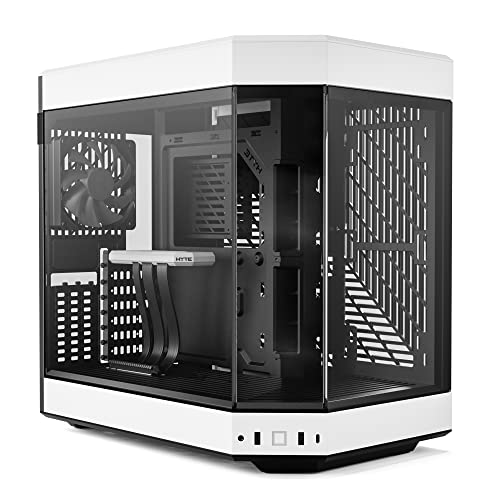
The HYTE Y70 is the flagship expression of the modern aesthetic HYTE helped popularise. Its full name on the listing is the HYTE Y70 Upgraded Modern Aesthetic Dual Chamber Panoramic Tempered Glass Mid-Tower ATX Computer Gaming Case, and each part of that name maps to a real design decision. The dual-chamber layout separates the main components from the power supply and cables. The panoramic tempered glass gives an unobstructed view into the main chamber. The included PCIE 4.0 riser cable lets the graphics card sit vertically as the visual centre of the build.
HYTE describes the Y70 as an upgraded dual-chamber ATX mid-tower that unlocks maximum performance through very large cooling capacity, with massive four-slot vertical graphics support. That four-slot figure matters: current high-end graphics cards routinely occupy three slots or more, and a case designed around vertical mounting has to leave room for the card and for air to reach its fans. The white finish of this version, model CS-HYTE-Y70-BW, pairs with the panoramic glass for the clean, bright look most showcase builds aim for.
Choose the Y70 if the build is meant to be seen. It is the case in this guide most focused on display, with the riser cable included rather than sold separately, and with the internal volume to handle large cards and extensive cooling hardware. Builders reusing a smaller or older power supply should still check cable lengths, since dual-chamber routing paths differ from a traditional tower, and builders planning a horizontal GPU mount should confirm the card length against the chamber layout before ordering.
2. HYTE Y60 — White
The HYTE Y60 is the earlier dual-chamber panoramic design from the same family, model CS-HYTE-Y60-BW in white. It uses a three-piece panoramic tempered glass design that HYTE says is built for display potential, wrapping the glass around the corner of the case so the build is visible from the front and the side at once. Like the Y70, it includes a PCIE 4.0 riser cable for vertical graphics card mounting, and it adds a protective riser cable canopy that integrates into the case and allows half-height PCI-E cards to sit behind the vertical graphics card.
The Y60’s case materials are listed as ABS, steel and tempered glass. Its motherboard support is the broadest in this guide: ITX, mATX, ATX and EATX boards are all listed in the maker’s specifications for the Y60. That makes it a flexible choice for builders who may change board sizes between builds, or who are moving an existing EATX workstation board into a more presentable case. The dual-chamber layout keeps the power supply and cabling out of the display chamber, which is what keeps the panoramic view clean.
Choose the Y60 if you want the panoramic dual-chamber look with the widest motherboard compatibility of the group. Compared with the Y70, it is the more established design with the same core ideas — panoramic glass, vertical GPU on an included riser, hidden PSU chamber — and its EATX support gives it an edge for larger boards. As with any glass-front design, plan intake airflow from the side and bottom positions the case provides, and keep cables tidy, because everything inside is visible.
3. NZXT H510 Elite — Matte White
The NZXT H510 Elite takes a different route to a modern look. Instead of a dual-chamber panoramic layout, it is a premium compact ATX mid-tower with a flush-mounted tempered glass front panel, behind which sit NZXT’s Aer RGB 2 fans. The construction is all steel and tempered glass, and the finish of this version is matte white. Where the HYTE cases show the whole build from two sides, the H510 Elite shows a framed, front-lit view, which suits desks where only the front and one side of the case are visible.
The H510 Elite includes the NZXT Smart Device 2, which powers the built-in RGB light strip and the case fans, so lighting control is handled by the case rather than depending entirely on the motherboard. NZXT also lists well-engineered airflow, a removable radiator mounting bracket, multiple fan filters, vertical GPU mount support and a front-panel USB-C connector among its key features. The removable radiator bracket is a practical touch: it makes installing a front radiator or fans easier because the bracket comes out of the case for mounting.
Choose the H510 Elite if you want a smaller footprint and a more restrained design. It is the compact option in this guide, and its steel-and-glass construction with a smart lighting controller suits builders who want coordinated lighting without adding separate controllers. Because it is compact, check graphics card length and radiator size against NZXT’s specifications for your exact parts, and note that the glass front means intake air is drawn through the case’s side vents, so giving the case breathing room on a desk matters.
4. RUIX OV603 — White
The RUIX OV603 is a white ATX mid-tower gaming case that pairs a tempered glass side panel with a high-airflow layout and the most complete out-of-box fan setup in this guide: four 120mm PWM ARGB fans are pre-installed. The listing describes a sleek tempered glass side panel that showcases the internal components while maintaining structural integrity with a reinforced steel frame, and a spacious interior measuring 423 × 212 × 492mm. For a clean, modern look that still prioritises airflow, that combination of glass on the side and fans included in the box is the OV603’s main argument.
The internal limits are clearly stated: the case supports ATX motherboards, graphics cards up to 400mm in length and CPU air coolers up to 165mm in height. A 400mm GPU allowance covers nearly every current graphics card, including long three-fan models, and 165mm of cooler clearance covers most large tower air coolers. Front connectivity includes USB 3.0 and Type-C ports, matching current motherboards. PWM control on the fans means their speed can be regulated by the motherboard rather than running at a fixed speed, and ARGB lighting can be coordinated with other components.
Choose the OV603 if you want a modern white case that is ready to build in without buying fans separately, and if air cooling is your plan. Its stated clearances are generous for an ATX mid-tower, and the tempered glass side panel keeps the showcase element while the rest of the design focuses on airflow and capacity. As with the other cases here, confirm your power supply length and radiator plans against the listing specifications if you intend to add liquid cooling later.
Comparison Table
| Product | ASIN | Case type | Motherboard support | Glass layout | Notable included features |
|---|---|---|---|---|---|
| HYTE Y70 — White | B0CX58ZF9G | Mid-tower ATX, dual chamber | ATX | Panoramic tempered glass | PCIE 4.0 riser cable, four-slot vertical graphics support |
| HYTE Y60 — White | B09TPZ5R6B | Mid-tower ATX, dual chamber | ITX, mATX, ATX, EATX | Three-piece panoramic tempered glass | PCIE 4.0 riser cable, riser cable canopy |
| NZXT H510 Elite — Matte White | B07T7L875Z | Compact ATX mid-tower | ATX | Tempered glass front panel | Aer RGB 2 fans, Smart Device 2, built-in RGB light strip, front USB-C |
| RUIX OV603 — White | B0F1F4PQYN | ATX mid-tower | ATX | Tempered glass side panel | Four 120mm PWM ARGB fans, USB 3.0 and Type-C, GPU clearance up to 400mm |
Frequently Asked Questions
What makes a PC case “modern”?
In current listings, a modern case usually combines tempered glass panels, a clean exterior with few visible vents or bays, USB-C on the front panel, and internal layouts that hide cables and the power supply. Dual-chamber designs such as the HYTE Y60 and Y70 take this furthest, separating the display chamber from the PSU and cable chamber entirely.
Do I need a riser cable for a vertical GPU mount?
Yes, a vertical mount needs a riser cable to connect the graphics card to the motherboard slot at an angle. The HYTE Y60 and Y70 include a PCIE 4.0 riser cable in the box. With cases that support vertical mounting but do not include a cable, the cable and sometimes a bracket must be bought separately, and the riser should match the PCIE generation of the motherboard and card.
Will a long graphics card fit in these cases?
Check the stated GPU clearance for the exact case. The RUIX OV603 lists graphics cards up to 400mm, which covers most current models. The HYTE Y70 is designed around massive four-slot vertical graphics. For the NZXT H510 Elite and HYTE Y60, measure your card and compare it with the maker’s specification for the mounting position you plan to use, since vertical and horizontal clearances can differ.
Is a glass front panel bad for airflow?
A glass front removes the front as an intake path, so these cases draw air through side, bottom or rear vents instead. Dual-chamber panoramic cases are designed around that pattern. The practical steps are to populate the fan positions the case provides, avoid pushing the case flush against a wall on its intake side, and choose a case with pre-installed fans, such as the RUIX OV603 or NZXT H510 Elite, if you do not want to plan the fan layout yourself.
Which of these cases is best for a first build?
The RUIX OV603 is the most forgiving starting point because its four fans are pre-installed, its clearances are clearly stated and its layout is a conventional single chamber with a glass side panel. The HYTE cases reward more planning with a cleaner finished look, and the NZXT H510 Elite suits builders who want built-in lighting control in a compact case.
Conclusion
For a showcase build, the HYTE Y70 is the fullest expression of the modern case: panoramic glass, a dual-chamber layout, an included riser cable and room for four-slot vertical graphics. The HYTE Y60 offers the same design language with the broadest motherboard support in this guide, including EATX. The NZXT H510 Elite is the compact, restrained alternative, with a glass front, steel construction and built-in lighting and fan control through its Smart Device 2. The RUIX OV603 is the practical modern option, pairing a tempered glass side panel with four pre-installed PWM ARGB fans, Type-C connectivity and generous stated clearances.
Whichever direction you choose, run the same three checks before ordering: motherboard format, graphics card length and cooler height against the case’s stated limits, and front-panel ports against your motherboard’s headers. A modern case is a long-lived part of a build — boards, cards and coolers change around it — so the case whose layout and clearances fit your next two builds, not just this one, is usually the right choice.