Our Short List of 3

- Best for: Students and home workers who want a straightforward laptop for writing, classes, and email.
- Display: 15.6-inch FHD display
- Processor: Intel Dual Core processor
- Memory: 8GB RAM
- Storage: 128GB SSD plus 128GB eMMC

- Best for: Students who carry their laptop daily and type in dim rooms, lecture halls, and libraries.
- Display: 15.6-inch Full HD display, 1920 x 1080
- Processor: AMD Ryzen 3 7320U quad-core, up to 4.1 GHz
- Memory: 8GB LPDDR5
- Storage: 128GB NVMe SSD
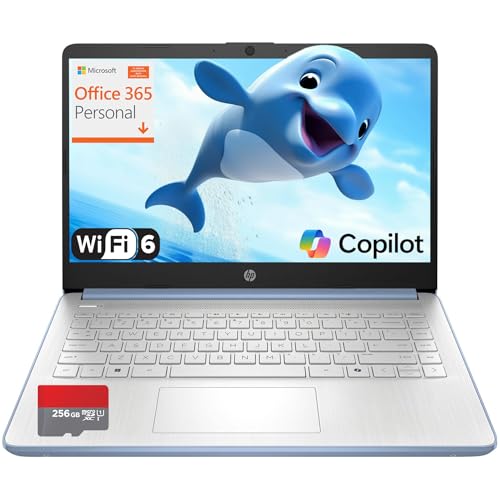
- Best for: School and remote work where a Full HD screen, 256GB of storage, and a simple setup matter most.
- Display: 15.6-inch FHD display
- Processor: Intel N100, 4 cores, up to 3.4 GHz
- Memory: 8GB DDR4 RAM
- Storage: 256GB SSD
All 4 Picks at a Glance
| Product | Specs | Action |
|---|---|---|
| Lenovo IdeaPad 1 |
| Check price on Amazon |
| Acer Aspire 3 A315-24P-R7VH |
| Check price on Amazon |
| HP 15.6-inch FHD Laptop 2026 |
| Check price on Amazon |
 ASUS Vivobook Go 15 |
| Check price on Amazon |
Key takeaways
- Find the best affordable laptops for school and business in November 2026, with long battery life, fast storage, and clear screens for class and work.
Choosing an affordable laptop for school and business is really a choice about which limits you can live with every day. A machine that runs out of storage mid-term or dies before the last lecture ends will cost far more in lost time than the money saved. The better question is which everyday tasks it must handle without complaint: essays and spreadsheets, video classes and meetings, research with many tabs open, and files that move between home, campus, and the office.
This guide is for students who need a dependable machine for coursework, people working from home or a small office, and families sharing one laptop between study and work. Every laptop below was chosen from the name and specifications shown on its Amazon product page, with attention to screen size, memory, storage, connectivity, and the operating system installed. The five picks cover different strengths, so the right one depends on whether you value a lighter carry, stronger multitasking, or the simplest possible setup.
Quick Picks
As an Amazon Associate we earn from qualifying purchases
| Product | Best for | Key spec from title |
|---|---|---|
| Lenovo IdeaPad 1 | A simple first laptop for classes and home office tasks | 15.6-inch FHD display, 8GB RAM, 128GB SSD plus 128GB eMMC |
| Lenovo IdeaPad Slim 3 | Everyday study and office work with roomier storage | 15.6-inch FHD display, AMD Ryzen 3 7320U, 8GB memory, 256GB storage |
| Acer Aspire 3 A315-24P-R7VH | A slim everyday laptop with a backlit keyboard | 15.6-inch Full HD display, AMD Ryzen 3 7320U, 8GB LPDDR5, 128GB NVMe SSD |
| HP 15.6-inch FHD Laptop 2026 | School and remote work with a full HD screen and Wi-Fi 6 | 15.6-inch FHD display, Intel N100, 8GB RAM, 256GB SSD |
| ASUS Vivobook Go 15 | Carrying between classes and meetings without extra bulk | 15.6-inch FHD slim laptop, AMD Ryzen 3 7320U, 8GB DDR5 RAM, 256GB SSD |
How to Choose
Match the processor to your real workload
The processor decides how smoothly ordinary work feels, and that work is heavier than it looks. Writing an essay while a video class runs, a spreadsheet stays open, and a dozen tabs wait in the background asks a lot of a budget chip. A quad-core processor such as the AMD Ryzen 3 7320U or the Intel N100 handles that mixed load far better than an older dual-core chip, which can hesitate when switching applications. Look for a current processor with at least four cores, then check that the rest of the machine keeps up. A strong processor paired with too little memory still stutters, so treat it as one part of a balanced package, not a single number to chase.
Get enough memory for multitasking
Memory is where affordable laptops most often disappoint, because the shortage only shows up once you are already busy. With 8GB of RAM, a student can keep a word processor, a browser with research tabs, a video call, and a messaging app open together without constant reloading. With only 4GB, the same day feels sluggish, tabs refresh when you return to them, and switching between a lecture and your notes takes longer. All five laptops in this guide come with 8GB of memory, a sensible floor for school and business work in 2026. If you regularly edit large documents or keep many tabs open for research, treat 8GB as the minimum and close applications you are not using.
Check storage type and usable space
Storage affects both speed and how long the laptop stays useful. A solid-state drive opens applications quickly, wakes from sleep promptly, and makes the whole machine feel responsive, while older eMMC storage is slower and suits light use. Capacity matters just as much: 128GB fills quickly once Windows, office software, class files, and downloaded course material accumulate, so a 256GB drive gives a student far more breathing room. Two laptops here pair a 128GB solid-state drive with extra storage, which works well if you also use cloud storage and keep large files elsewhere. Before buying, count the applications and files you already keep, and favour the larger drive when the choice is close.
Weigh screen, keyboard, ports, and battery life
The screen and keyboard deserve as much attention as the processor, because you face them for hours every day. A 15.6-inch Full HD display shows a document and a reference window side by side, and makes spreadsheets far easier to read than a smaller, lower-resolution panel. A backlit keyboard helps during evening study and dim lecture halls, while a numeric keypad speeds up data entry for accounting and science coursework. Ports matter too: USB-C, USB-A, HDMI, and a headphone jack let you connect a second monitor, a mouse, and a headset without carrying adapters. Finally, check battery life and weight together: a laptop that lasts through classes but weighs too much to carry comfortably still fails the daily test.
The 5 Best Options
Lenovo IdeaPad 1
- Best for: Students and home workers who want a straightforward laptop for writing, classes, and email.
- Display: 15.6-inch FHD display
- Processor: Intel Dual Core processor
- Memory: 8GB RAM
- Storage: 128GB SSD plus 128GB eMMC
Students and home workers who want a straightforward laptop for writing, classes, and email.
The 128GB solid-state drive fills quickly, so plan to use cloud storage or an external drive for large files.
The Lenovo IdeaPad 1 suits a buyer who wants the simplest route to a working school and business laptop, with no extra setup to worry about. Its 15.6-inch Full HD display gives essays and spreadsheets room to breathe, while 8GB of RAM keeps everyday multitasking steady for writing, browsing, email, and video classes. The 128GB solid-state drive plus 128GB of eMMC storage covers documents and class files with cloud storage, and Wi-Fi 6 keeps video calls stable on a busy home network. Windows 11 Home arrives ready to use, and the included year of Office 365 means Word, Excel, and PowerPoint are available from the first day.
Lenovo IdeaPad Slim 3
The Lenovo IdeaPad Slim 3 is the pick for a student or office worker who wants a bit more headroom without moving to a heavier or more complicated machine. Its AMD Ryzen 3 7320U processor handles mixed days well, moving between documents, research, meetings, and messaging without the hesitation weaker chips show. The 256GB of storage is the real advantage, giving room for applications and coursework without constant tidying. The 15.6-inch Full HD screen keeps text sharp for long reading, and Windows 11 provides the familiar desktop most school and workplace software expects. It is a balanced choice for one laptop covering morning lectures and afternoon office tasks.
Specs
- Display: 15.6-inch FHD display
- Processor: AMD Ryzen 3 7320U
- Memory: 8GB memory
- Storage: 256GB storage
- Operating system: Windows 11
- Specific uses: Business, Multimedia, Student
Best for: Everyday study and office work where 256GB of storage and a capable processor matter more than extras.
Watch out for: Confirm the exact configuration on the listing before ordering, because this model line is sold in several memory and storage combinations.
ASIN: B0C3MNPB8P
Acer Aspire 3 A315-24P-R7VH
- Best for: Students who carry their laptop daily and type in dim rooms, lecture halls, and libraries.
- Display: 15.6-inch Full HD display, 1920 x 1080
- Processor: AMD Ryzen 3 7320U quad-core, up to 4.1 GHz
- Memory: 8GB LPDDR5
- Storage: 128GB NVMe SSD
Students who carry their laptop daily and type in dim rooms, lecture halls, and libraries.
Storage is limited to 128GB, so heavy media files and large downloads will need cloud or external storage.
The Acer Aspire 3 A315-24P-R7VH fits a buyer who carries a laptop everywhere and types in all kinds of light. Its slim body and 15.6-inch Full HD display slip easily into a bag, while the backlit keyboard keeps evening work comfortable. The AMD Ryzen 3 7320U quad-core processor, running up to 4.1 GHz, gives it enough pace for essays, spreadsheets, and video calls running together. With 8GB of LPDDR5 memory and a 128GB NVMe solid-state drive, applications open quickly and the system stays responsive through a normal study day. Wi-Fi 6 and Windows 11 Home round out a package that asks little of its owner.
HP 15.6-inch FHD Laptop 2026
- Best for: School and remote work where a Full HD screen, 256GB of storage, and a simple setup matter most.
- Display: 15.6-inch FHD display
- Processor: Intel N100, 4 cores, up to 3.4 GHz
- Memory: 8GB DDR4 RAM
- Storage: 256GB SSD
School and remote work where a Full HD screen, 256GB of storage, and a simple setup matter most.
The display resolution and included accessories vary between listings, so read the exact listing details before buying.
The HP 15.6-inch FHD Laptop 2026 suits a household where one laptop must cover school, work, and video calls. Its Intel N100 processor, with four cores up to 3.4 GHz, handles everyday work calmly, and 8GB of DDR4 memory keeps a browser, a document, and a meeting open. The 256GB solid-state drive is generous for this class of laptop, leaving room for office software and class files, while the Full HD display keeps long reading sessions comfortable. Wi-Fi 6, Office 365, and Windows 11 Home come together as a ready-to-work setup, and Type-C and RJ45 help when a wired network or second display is available.
ASUS Vivobook Go 15
- Best for: Mobile students and workers who carry a laptop all day and want a slim, durable machine with 256GB of storage.
- Display: 15.6-inch FHD display
- Processor: AMD Ryzen 3 7320U quad-core
- Memory: 8GB DDR5 RAM
- Storage: 256GB SSD
Mobile students and workers who carry a laptop all day and want a slim, durable machine with 256GB of storage.
Check the exact model number on the listing, because the Vivobook Go 15 is sold in several processor and storage combinations.
The ASUS Vivobook Go 15 suits a buyer who values portability and durability with a full-size screen. Its slim 15.6-inch Full HD body travels well between home and campus, and its military-grade durability suits a machine carried and opened daily. The AMD Ryzen 3 7320U processor and 8GB of DDR5 memory give it enough pace for writing, research, and meetings, while the 256GB solid-state drive holds coursework and work files. Fast charging helps between classes, the webcam shield adds privacy for video calls, and Windows 11 Home keeps the software familiar. For a student or mobile worker, it balances lightness with enough storage and memory for the term.
Which One Fits Your Situation
You want the simplest laptop for classes and homework
Pick the Lenovo IdeaPad 1. Its Full HD display, 8GB of memory, and included year of Office 365 cover writing, research, and video classes with no extra software to buy or install. The setup is straightforward, the screen is large enough for documents and lecture windows side by side, and Wi-Fi 6 keeps online classes stable. Just keep an eye on storage, and use cloud storage for files you do not need every day.
You juggle documents, meetings, and research tabs all day
Pick the Lenovo IdeaPad Slim 3. The Ryzen 3 processor and 256GB of storage give you room to keep a word processor, a spreadsheet, a browser full of research, and a video meeting open without constantly closing things. It is the most balanced option here for a long day that mixes school and office work, and the larger drive means you spend less time deleting files to make space.
You carry your laptop everywhere and work late
Pick the Acer Aspire 3 A315-24P-R7VH. The slim body and 3.9-pound weight travel well in a backpack, the backlit keyboard helps during evening study, and the quad-core Ryzen processor keeps everyday work moving. The 128GB drive is the trade-off, so pair it with cloud storage and keep large media files off the machine.
You share one laptop between school, work, and video calls
Pick the HP 15.6-inch FHD Laptop 2026 or the ASUS Vivobook Go 15. The HP suits a shared household machine with its Full HD screen, 256GB drive, and wired network connection, while the ASUS suits the person who carries it out of the house, thanks to its slim body, fast charging, and webcam shield. Choose the HP for a desk-based household and the ASUS for life on the move.
Common Mistakes
- Buying a laptop with only 4GB of memory and expecting it to handle video classes, a browser, and a document at the same time.
- Choosing 128GB of storage without a plan for cloud or external storage, then running out of space during the term.
- Picking a small or low-resolution screen to save money, then struggling to read spreadsheets and lecture slides for hours.
- Ignoring ports and Wi-Fi, and discovering too late that the laptop cannot connect to a second monitor, a headset, or a wired network.
- Ordering a look-alike model number without checking the processor, memory, and storage on the exact listing.
Frequently Asked Questions
How much memory does a school and business laptop need?
For most students and office workers, 8GB of memory is the sensible minimum in 2026. It lets you keep a word processor, a browser with research tabs, email, and a video call open together without constant reloading. With less memory, switching between a lecture and your notes slows down, and tabs refresh when you return. If you edit large documents, close what you are not using.
Is 128GB of storage enough for school and business use?
It can be enough, but only with a plan. Windows and office software take a large share of a 128GB drive, leaving limited room for coursework, photos, and downloads. A 256GB drive is a safer choice for most buyers, because it holds applications and files without constant tidying. If you choose 128GB, use cloud storage for documents and move large files to an external drive.
Does a budget laptop handle video classes and meetings well?
Yes, provided the processor, memory, and Wi-Fi are adequate. A quad-core processor with 8GB of memory handles video calls alongside notes and a browser, and Wi-Fi 6 helps on busy home networks. A clear webcam and a built-in microphone matter too, because they decide how well classmates and colleagues can see and hear you. Test the camera and microphone before your first important class or meeting.
Should I choose a touchscreen laptop for school?
A touchscreen is useful for annotating slides, signing documents, and navigating quickly, but it is not essential for most school and business work. A good keyboard, a clear Full HD screen, enough memory, and a solid-state drive matter far more day to day. Choose a touchscreen only when you know you will use it often, and do not sacrifice memory or storage to get one.