Key takeaways
- Compare the best 16-inch creator laptops for home production studios, with colour-accurate displays, fast GPUs, generous storage and studio-ready ports.
As an Amazon Associate, we earn from qualifying purchases made through links on this page.
A home production studio asks a lot of a single machine. The same laptop has to cut 4K timelines in the morning, sit colour-critical in a photo edit after lunch, and still have the ports and storage headroom for card readers, audio interfaces and backup drives in the evening. The 16-inch class has quietly become the sweet spot for that job: the screens are large enough to work on without an external monitor for short sessions, the chassis have room for proper cooling and discrete graphics, and most models still fit in a normal backpack when the studio has to move.
Every laptop in this roundup has a 16-inch-class display with wide colour coverage, a fast multi-core processor, and either a discrete NVIDIA GPU or Apple silicon with strong media engines, because those are the three things that decide how a home studio actually feels day to day. We compared colour accuracy, sustained performance, memory and storage ceilings, and how each machine connects to the rest of a desk setup. There are four picks below: a macOS flagship, two Windows creator laptops built specifically for this work, and one slim high-performance model that doubles as a gaming machine after hours.
What to Look for in a 16-Inch Creator Laptop
Display accuracy comes first. For photo and video work, look for full coverage of the DCI-P3 colour space, a factory calibration report or a low Delta E figure, and enough brightness to work in a normally lit room. OLED and Mini LED panels both deliver the contrast grading work needs; resolution matters less than accuracy, but 2560×1600 or higher keeps timelines and toolbars comfortable on a 16-inch panel.
Match the GPU to your software. Premiere Pro, DaVinci Resolve, Blender and After Effects all lean on GPU acceleration, and NVIDIA’s Studio drivers are the safest bet on Windows. On macOS, the Pro and Max chips carry dedicated media engines that handle ProRes and H.264/H.265 encoding in hardware. Either way, 8 GB of video memory is a sensible floor for 4K work, and more headroom helps with 3D and AI-assisted effects.
Memory and storage are the specs you cannot fix later. Most creator laptops in this class solder their memory, so 32 GB should be treated as the working minimum for a studio machine, with 64 GB worthwhile if you run large Lightroom catalogues, complex After Effects compositions or virtual instruments. For storage, 1 TB is workable if you archive to external drives; 2 TB is more comfortable when active projects live on the internal SSD.
Ports decide how clean your desk stays. A home studio laptop should connect to an external monitor, a card reader, an audio interface and a backup drive without a drawer full of adapters. Thunderbolt or USB4, HDMI, a full-size SD reader and at least one USB-A port is the combination to look for, and it also makes a one-cable dock setup possible.
Cooling and noise matter more at home. A studio laptop spends long render sessions on a desk near microphones, so a chassis that can sustain performance without constant fan noise is worth prioritising over the thinnest possible design.
Apple MacBook Pro 16-inch (M4 Pro)

The 16-inch MacBook Pro with M4 Pro is the reference point for creator laptops, and it earns that position in a home studio through its display and its media engines as much as its raw speed. The Liquid Retina XDR panel covers the P3 wide colour space, reaches high sustained brightness for HDR work, and its ProMotion refresh keeps timeline scrubbing smooth. The M4 Pro chip pairs a 14-core CPU with a 20-core GPU and hardware accelerators for ProRes, H.264 and HEVC, which is exactly the codec mix most home studios push through every day.
This configuration carries 24 GB of unified memory and a 512 GB SSD, which suits editors who keep active projects lean and archive to external drives. Memory and storage are fixed at purchase, so heavier multitaskers should step up to a higher configuration of the same machine rather than expect upgrades later. Port selection is unusually complete for a slim laptop: three Thunderbolt 5 ports, HDMI, an SDXC card slot and MagSafe charging, so a camera card, a monitor and a drive can all connect at once.
- ASIN: B0DLHDCN6P — View on Amazon
- CPU: Apple M4 Pro, 14-core CPU
- GPU: 20-core integrated GPU with hardware ProRes and HEVC media engines
- Memory: 24 GB unified memory (fixed, not upgradeable)
- Storage: 512 GB SSD (fixed, not upgradeable)
- Display: 16.2-inch Liquid Retina XDR, 3456×2234, P3 wide colour, ProMotion up to 120Hz, up to 1,600 nits peak HDR brightness
- Ports: 3× Thunderbolt 5 (USB-C), HDMI, SDXC card reader, MagSafe 3, 3.5mm headphone jack
- Battery: 100 Wh
- Weight: About 2.14 kg
Best for: Video editors and photographers already working in the Apple ecosystem, especially Final Cut Pro, Logic Pro and ProRes workflows.
Limitations: Memory and storage cannot be upgraded after purchase, the 512 GB SSD fills quickly with 4K footage, and Windows-only studio software requires a different pick.
Lenovo Yoga Pro 9i 16 (Gen 9)

Lenovo’s Yoga Pro 9i is the Windows creator laptop that most directly answers the MacBook Pro, and its Mini LED display is the reason. The 3.2K PureSight Pro panel is factory calibrated to a Delta E of 1 or better, covers the sRGB, DCI-P3 and Adobe RGB colour spaces, and peaks at 1,200 nits, which makes it a genuine grading screen rather than just a bright one. The 165Hz refresh rate also keeps pen input and timeline work feeling responsive.
Inside, the Core Ultra 9 185H and GeForce RTX 4060 run on NVIDIA Studio drivers, with the GPU fed up to 100W so it sustains performance through long exports better than slimmer rivals. The 32 GB of memory is soldered, but the 1 TB SSD sits in a standard M.2 slot. Connectivity is a strong point for a home studio: Thunderbolt 4, a second USB-C port, two USB-A ports, HDMI and a full-size SD card reader mean cameras, interfaces and drives plug straight in.
- ASIN: B0DBX5VKLH — View on Amazon
- CPU: Intel Core Ultra 9 185H (16 cores, up to 5.1 GHz)
- GPU: NVIDIA GeForce RTX 4060 Laptop GPU, 8 GB GDDR6, up to 100W TGP, NVIDIA Studio drivers
- Memory: 32 GB LPDDR5X (soldered, not upgradeable)
- Storage: 1 TB PCIe Gen 4 NVMe SSD
- Display: 16-inch 3.2K (3200×2000) Mini LED touch, 165Hz, up to 1,200 nits, 100% sRGB / DCI-P3 / Adobe RGB, Delta E ≤ 1, DisplayHDR 1000
- Ports: Thunderbolt 4, USB-C 3.2 Gen 2, 2× USB-A, HDMI, full-size SD card reader, 3.5mm audio
- Battery: 84 Wh
- Weight: About 2.05 kg
Best for: Windows-based photographers and video editors who want the most colour-accurate built-in display in this group and a full set of legacy ports.
Limitations: Memory is soldered at 32 GB, the Mini LED panel uses more power than an IPS screen at high brightness, and the RTX 4060 is a step behind the RTX 4070 and 5070 class for heavy 3D work.
ASUS ProArt P16 (H7606WP)
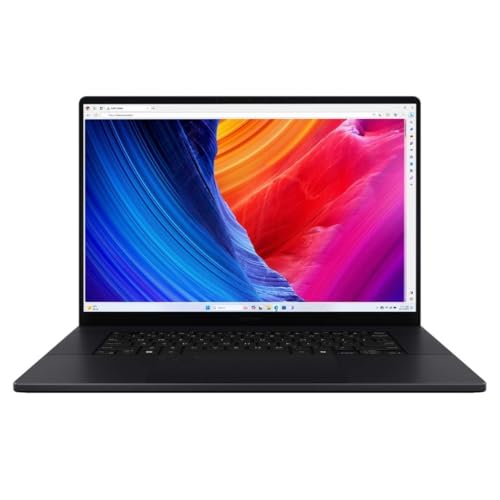
The ProArt P16 is built for creators first and everyone else second. Its 16-inch OLED touchscreen is Pantone Validated with full DCI-P3 coverage, the touchpad carries ASUS’s DialPad ring for brush size and timeline control in Adobe apps, and the whole machine is tuned around NVIDIA Studio software. This configuration pairs AMD’s Ryzen AI 9 HX 370 with a GeForce RTX 5070, 64 GB of memory and a 2 TB SSD, which is the most headroom of any Windows pick here and the combination that suits a studio juggling editing, design and music production on one machine.
The port layout is designed for desk work: USB4, USB-C, USB-A, HDMI 2.1 and an SD card reader, so ingesting footage and driving an external monitor does not need a hub. At about 1.85 kg it is also the lightest Windows laptop in this roundup, which helps if the home studio occasionally relocates. The trade-offs are the glossy touchscreen, which can reflect studio lighting, and memory that is soldered in place, although 64 GB makes that easier to accept.
- ASIN: B0FGWMY9FV — View on Amazon
- CPU: AMD Ryzen AI 9 HX 370 (12 cores, up to 5.1 GHz), XDNA 2 NPU
- GPU: NVIDIA GeForce RTX 5070 Laptop GPU, 8 GB GDDR7, NVIDIA Studio drivers
- Memory: 64 GB LPDDR5X (soldered, not upgradeable)
- Storage: 2 TB PCIe SSD
- Display: 16-inch 4K OLED touchscreen (3840×2400), 100% DCI-P3, Pantone Validated
- Ports: USB4, USB-C 3.2, 2× USB-A, HDMI 2.1, SD card reader, 3.5mm audio
- Battery: 90 Wh
- Weight: About 1.85 kg
- Operating system: Windows 11 Pro
Best for: Multi-discipline creators who want one Windows machine for video, design and audio work, and who value the large memory and storage ceiling.
Limitations: The glossy OLED reflects bright studio lights, memory cannot be expanded later, and this configuration is sold through a specialist reseller listing, so check the exact specification on the product page before ordering.
Razer Blade 16 (2026)

The Blade 16 is the gaming-born entry in this group, included because its hardware maps directly onto home studio work: a factory-calibrated 16-inch OLED with full DCI-P3 coverage, a 16-core Intel Core Ultra 9 processor and an RTX 5070 Ti with 12 GB of GDDR7 memory, which is the most video memory of any pick here and a real advantage for DaVinci Resolve effects and 3D rendering. Razer sells it for gaming and creating alike, and in a slim CNC aluminium chassis that takes up little desk space.
For studio duty the details are mostly right: Thunderbolt 5 and Thunderbolt 4 ports, HDMI 2.1, a microSD reader and dual M.2 slots that let storage grow to multiple terabytes. The 240Hz refresh rate is wasted on editing but makes motion work and interface navigation feel exceptionally fluid. Where it asks for compromise is memory, which is soldered at 32 GB in this configuration, and its gaming-first keyboard lighting and software, which some studio users will want to tone down.
- ASIN: B0H31TTZJT — View on Amazon
- CPU: Intel Core Ultra 9 386H (16 cores, up to 4.9 GHz)
- GPU: NVIDIA GeForce RTX 5070 Ti Laptop GPU, 12 GB GDDR7, up to 140W TGP
- Memory: 32 GB LPDDR5X (soldered, not upgradeable)
- Storage: 1 TB PCIe 4.0 NVMe SSD (dual M.2 slots, expandable)
- Display: 16-inch QHD+ OLED (2560×1600), 240Hz, 100% DCI-P3, DisplayHDR TrueBlack 1000, up to 1,100 nits HDR peak
- Ports: Thunderbolt 5, Thunderbolt 4, USB-A, HDMI 2.1, microSD card reader, 3.5mm audio
- Weight: About 2.14 kg
Best for: Creators who also game, or whose studio work leans on GPU-heavy tools such as Resolve, Blender and Unreal Engine, and who want the strongest graphics option in a slim chassis.
Limitations: Memory is soldered, the card reader is microSD rather than full-size SD, and its gaming design language will not suit every studio desk.
Comparison Table
| Model | CPU | GPU | Memory | Storage | Display | Card reader |
|---|---|---|---|---|---|---|
| Apple MacBook Pro 16 (M4 Pro) | M4 Pro 14-core | 20-core integrated, media engines | 24 GB | 512 GB | 16.2″ Liquid Retina XDR, P3 | SDXC |
| Lenovo Yoga Pro 9i 16 (Gen 9) | Core Ultra 9 185H | RTX 4060 8 GB | 32 GB | 1 TB | 16″ 3.2K Mini LED, P3 + Adobe RGB | Full-size SD |
| ASUS ProArt P16 (H7606WP) | Ryzen AI 9 HX 370 | RTX 5070 8 GB | 64 GB | 2 TB | 16″ 4K OLED touch, P3 | SD |
| Razer Blade 16 (2026) | Core Ultra 9 386H | RTX 5070 Ti 12 GB | 32 GB | 1 TB | 16″ QHD+ OLED 240Hz, P3 | microSD |
FAQ
Is 32 GB of memory enough for a home production studio?
For most photo editing, 4K video timelines and music production, yes. Memory becomes the bottleneck with large After Effects projects, big sample libraries or several creative apps open at once, which is where a 64 GB configuration such as the ProArt P16 earns its place. Because memory is soldered on all four laptops here, choose for the workload you expect in two years, not just today.
Does a creator laptop still need an external monitor?
Not for editing, layout or mixing: all four displays here are colour-accurate enough for client work. Many home studios still add a larger monitor for timeline space and keep the laptop screen for scopes, previews or a mixer window, and every pick here can drive at least one external display over HDMI or Thunderbolt.
Which of these is best for DaVinci Resolve?
Resolve leans heavily on the GPU and on video memory. The Razer Blade 16’s RTX 5070 Ti with 12 GB of memory gives it the most headroom for effects-heavy grades, while the MacBook Pro’s media engines are extremely efficient with ProRes camera originals. The ProArt P16 and Yoga Pro 9i sit between the two and handle typical 4K Resolve timelines comfortably.
Can these laptops connect to studio audio interfaces and control surfaces?
Yes. Each machine here offers USB-C or Thunderbolt plus USB-A or an adapter path for interfaces, MIDI controllers and control surfaces, and all four support one-cable USB-C or Thunderbolt docks, which is the cleanest way to keep a home studio desk wired once and connected in seconds.
Conclusion
For a home production studio, the best 16-inch creator laptop is the one whose screen you can trust and whose fixed specifications you will not outgrow. The MacBook Pro 16 with M4 Pro remains the safest all-round choice for video and photo work inside the Apple ecosystem. On Windows, the ASUS ProArt P16 offers the most complete creator package here, with 64 GB of memory, 2 TB of storage and a Pantone Validated OLED. The Lenovo Yoga Pro 9i answers with the most accurate Mini LED display and the friendliest port selection, while the Razer Blade 16 is the pick when GPU power matters most. Match the machine to your software first, and any of the four will anchor a home studio for years.