Key takeaways
- Five 32-inch 4K OLED computer monitors compared on panel type, colour, USB-C power and curve, from ASUS, MSI, Alienware, Samsung and LG listings.
A 32-inch 4K OLED is the first monitor class that genuinely serves two desks at once: the working desk, where per-pixel contrast and colour decide how photos, video timelines and documents look, and the gaming desk, where the same panel has to move without smearing. The buying decision is not whether OLED is good enough — it is which of several near-identical specification sheets differs in the ways that matter to you: panel wording, colour coverage, USB-C power, screen finish and whether the panel is flat or curved.
All five picks below are 32-inch-class models whose listings state 4K UHD resolution and a 240Hz refresh rate. They were chosen from the details on their own Amazon listings, and the differences are in the fine print: four listings describe a QD-OLED panel while the LG listing simply says OLED, two list 90W USB-C delivery for a laptop, one is curved, and one adds a glare-free finish with smart monitor features.
Quick Picks
As an Amazon Associate we earn from qualifying purchases.
| Product | Best for | Key spec from title |
|---|---|---|
| ASUS ROG Swift OLED PG32UCDM | Colour-critical work plus gaming | 32-inch QD-OLED, 99 percent DCI-P3 |
| MSI MPG 321URX QD-OLED | Single-cable laptop desks | 90W USB Type-C, DisplayHDR True Black 400 |
| Alienware AW3225QF | Immersive curved gaming | 31.6-inch QD-OLED, curved panel |
| Samsung Odyssey OLED G8 | Bright rooms and smart features | Glare-free QD-OLED, Gaming Hub |
| LG UltraGear 32GS95UE | Mixed PC and console setups | OLED panel, HDMI 2.1, FreeSync Premium Pro |
How to Choose
Panel Wording: QD-OLED Versus OLED as Listed
Four of the five listings in this roundup name their panel QD-OLED; the LG 32GS95UE listing describes its panel simply as OLED, without the QD label. That wording difference is worth respecting rather than smoothing over, because it is the only panel distinction the listings themselves make. In practice, buyers compare these panels on brightness behaviour, colour volume and how they handle ambient light, and the honest starting point is what each manufacturer chose to print. If panel technology is your top criterion, compare the four QD-OLED models against each other first, then judge the LG on its full listed package — HDR certification, sync support and ports — rather than assuming its panel matches the others.
Refresh Rate and Response for Fast Content
Every monitor here lists a 240Hz refresh rate, and four of the five list a 0.03ms response time, so the headline motion numbers are effectively tied. That makes the decision easier, not harder: you do not need to trade resolution for speed anywhere in this group. What still separates them is how you will use the speed. Competitive players care about the flat, uniform view; sim and adventure gamers may prefer the Alienware’s curve. For work, 240Hz simply means scrolling, scrubbing timelines and dragging windows feel immediate. Since the listings match on speed, let colour, ports and finish make the decision instead of chasing a specification that does not differ.
Colour and HDR for Creative Work
If the monitor earns money, read the colour lines closely. The ASUS PG32UCDM lists 99 percent DCI-P3 coverage and True 10-bit colour, the strongest creative specification in this group as listed. The MSI MPG 321URX and the LG 32GS95UE both list DisplayHDR True Black 400 certification, which describes how the panel handles HDR highlights against true black levels. The Samsung and Alienware listings emphasise their QD-OLED panels and gaming features over colour metrics. None of that makes any of them poor for editing — OLED contrast flatters most work — but if you grade colour for clients, the model whose listing actually prints a colour gamut figure is the safer professional pick.
Ports, USB-C Power, Curve and Finish
Desk practicalities finish the decision. The ASUS and MSI listings both state 90W USB-C delivery, enough to run and charge most laptops over the same cable that carries the picture, which transforms a cluttered desk. The LG lists HDMI 2.1 and DisplayPort, suiting a mixed PC and console setup. Shape matters too: the Alienware is the only curved panel here, at 1700R per listing-derived copy, wrapping the image for immersion but dividing opinion for design work. Finally, the Samsung’s glare-free finish suits bright rooms where the glossy panels reflect windows. List your desk’s actual constraints first, then see which listing answers them.
The 5 Best Options
ASUS ROG Swift OLED PG32UCDM

The PG32UCDM is the pick for buyers whose work is colour-critical and whose evenings are competitive. Its listing pairs a 32-inch QD-OLED panel with 99 percent DCI-P3 coverage and True 10-bit colour, the most complete creative specification in this roundup, while keeping the group’s standard 240Hz refresh and 0.03ms response. G-SYNC Compatible support covers gaming, and 90W USB-C means a laptop can drive it and charge from one cable. If one monitor has to grade photos by day and run fast games by night without compromise on either side, this is the listing that argues for itself in both directions.
Specs
- Panel: 32-inch QD-OLED
- Resolution: UHD 3840 x 2160
- Refresh rate: 240Hz
- Response: 0.03ms
- Colour: 99 percent DCI-P3; True 10-bit
- Sync: G-SYNC Compatible
- USB-C: 90W
Best for: Colour-critical creative work that shares a desk with serious gaming.
Watch out for: A similar model name, the PG32UCDMR, is a different monitor; check the exact model code on the listing before ordering.
ASIN: B0CV26XVMD
MSI MPG 321URX QD-OLED

The 321URX is the laptop-desk specialist. Its listing states a 31.5-inch class QD-OLED panel at 3840 x 2160 with the same 240Hz and 0.03ms figures as the rest of the group, plus DisplayHDR True Black 400. The detail that defines it is 90W USB Type-C alongside HDMI and DisplayPort, so a single cable can carry picture and power to a work laptop while the desktop PC stays connected on another input. For hybrid workers who dock and undock daily, that convenience is worth more than marginal panel differences, and nothing in the listed specification asks you to give up gaming performance to get it.
Specs
- Panel: 31.5-inch class QD-OLED (Quantum Dot OLED)
- Resolution: 3840 x 2160
- Refresh rate: 240Hz
- Response: 0.03ms
- HDR: DisplayHDR True Black 400
- USB Type-C: 90W
- Inputs: HDMI, DisplayPort
Best for: Hybrid workers who want one cable for a laptop and full gaming speed after hours.
Watch out for: MSI also lists a curved variant, the MPG 321CURX, under a similar name; confirm you are looking at the flat 321URX.
ASIN: B0CTSC3VS4
Alienware AW3225QF

The AW3225QF is the immersion pick, and the only curved monitor in this group. Its listing describes a 31.6-inch QD-OLED panel at 4K UHD with a 240Hz refresh rate, and listing-derived copy puts the curve at 1700R. That wrap suits racing, flight and open-world games, where peripheral vision sells the scene, and the curve is gentle enough that desktop work remains comfortable for most people. Buyers who do precision layout or design work often prefer a flat panel for straight lines, which is the honest trade here. As a dedicated gaming and entertainment screen with real 4K OLED contrast, it makes the strongest case for the curve.
Specs
- Panel: 31.6-inch QD-OLED
- Resolution: 4K UHD 3840 x 2160
- Refresh rate: 240Hz
- Curve: 1700R, per listing-derived copy
- Model number: AW3225QF
Best for: Immersive single-player, racing and sim gaming on a curved 4K OLED.
Watch out for: This model appears under more than one listing; order from the canonical listing recorded here and check the model number AW3225QF matches.
ASIN: B0CVQGSRZ9
Samsung Odyssey OLED G8

The G80SD answers the problem glossy OLED panels have in real rooms: reflections. Its listing highlights a glare-free display over a 32-inch QD-OLED panel with 4K resolution, a 240Hz refresh rate and 0.03ms response, plus G-Sync Compatible support. Samsung also positions it as a Smart Gaming Monitor with its Gaming Hub, which suits buyers who stream game and video services from the screen itself. If your desk faces a window or sits under bright lights, the finish is a genuine deciding feature rather than a marketing line, and it costs nothing in headline performance against the rest of this group.
Specs
- Panel: 32-inch QD-OLED
- Resolution: 4K UHD
- Refresh rate: 240Hz
- Response: 0.03ms
- Sync: G-Sync Compatible
- Finish: glare-free display
- Smart features: Gaming Hub (Smart Gaming Monitor)
- Model: LS32DG800SNXZA
Best for: Bright rooms and buyers who want smart streaming features built into the monitor.
Watch out for: A separate Renewed listing exists for this model; make sure the listing you open is the new unit, not the refurbished one.
ASIN: B0DHJ8B7TP
LG UltraGear 32GS95UE
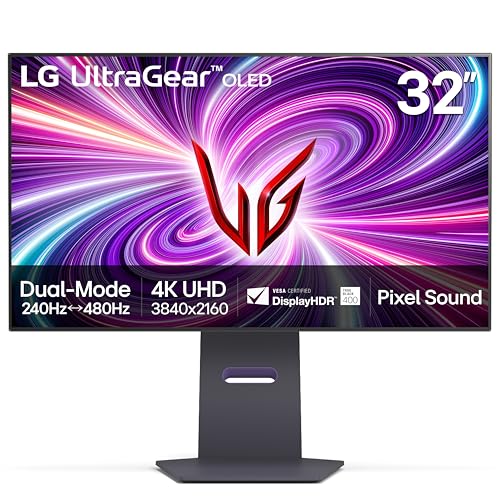
The 32GS95UE is the straightforward all-rounder, with one wording caveat handled honestly: its listing calls the panel OLED rather than QD-OLED, so it is presented that way here. The rest of the specification is fully competitive — UHD resolution, 240Hz refresh, 0.03ms response and DisplayHDR True Black 400 — and it is the only model listing both AMD FreeSync Premium Pro and NVIDIA G-Sync support, which suits desks that swap between graphics cards or between PC and console. HDMI 2.1 and DisplayPort complete a connection set aimed at mixed setups. Judge it as a complete package rather than a panel label.
Specs
- Panel: 32-inch OLED (as listed; not labelled QD-OLED)
- Resolution: UHD
- Refresh rate: 240Hz
- Response: 0.03ms
- HDR: DisplayHDR True Black 400
- Sync: AMD FreeSync Premium Pro; NVIDIA G-Sync
- Inputs: HDMI 2.1, DisplayPort
- Model: 32GS95UE-B
Best for: Mixed PC and console desks that want both major sync technologies in one screen.
Watch out for: Do not assume the panel matches the QD-OLED models on labelling; the listing says OLED, and the model code 32GS95UE-B is the identifier to match.
ASIN: B0CV1Y7NLT
Which One Fits Your Situation
You Grade Photos or Video for Clients
Choose the ASUS PG32UCDM. It is the only listing here that prints a colour gamut figure — 99 percent DCI-P3 — alongside True 10-bit colour, which is the evidence a professional needs before trusting a panel with paid work. The 240Hz refresh and G-SYNC Compatible support mean the same screen handles gaming without a second monitor.
Your Desk Runs on a Laptop Dock
Choose the MSI MPG 321URX. Its listed 90W USB Type-C connection carries the picture and charges the laptop in one cable, while HDMI and DisplayPort keep a desktop or console attached. Dock in the morning, undock at night, and the 240Hz QD-OLED panel does gaming duty in between without any specification compromises.
You Play Big Single-Player Games at Night
Choose the Alienware AW3225QF. The curved 31.6-inch QD-OLED wraps racing circuits and open worlds around your peripheral vision in a way the flat panels cannot, and 4K at 240Hz keeps motion clean. Pick it for immersion first; if your work involves precise straight-line layout, weigh the curve before committing.
Your Room Is Bright and Full of Windows
Choose the Samsung Odyssey OLED G8. The glare-free finish in its listing directly addresses reflections that plague glossy OLED screens in daylight, and the Gaming Hub smart features reduce the need for extra streaming hardware. Performance matches the group, so the finish and the smart platform are free advantages in a bright space.
Common Mistakes
- Assuming all five panels are identical because the resolution and refresh rate match; the LG listing says OLED where the others say QD-OLED, and finishes and colour specifications differ.
- Clicking a Renewed or refurbished listing by mistake — the Samsung G8 has one — and expecting a new unit.
- Confusing sibling models with near-identical names, such as the curved MSI variant or the step-up Gigabyte Pro model, and ordering the wrong screen.
- Ignoring USB-C wattage, then finding a monitor charges your laptop too slowly or not at all over the display cable.
- Leaving static desktop elements on screen all day without using the panel care habits OLED screens expect, such as letting the taskbar hide and varying content.
Frequently Asked Questions
Are all five of these monitors QD-OLED?
Four listings — ASUS, MSI, Alienware and Samsung — describe QD-OLED panels. The LG 32GS95UE listing describes its panel simply as OLED, without the QD label, and this article keeps that distinction rather than assuming the panels are the same. If panel type is your deciding factor, compare the four QD-OLED models directly and judge the LG on its complete listed specification.
Do all five run at 240Hz in 4K?
Yes, as listed. Every monitor in this roundup states a 4K UHD resolution with a 240Hz refresh rate, and four of the five state a 0.03ms response time. That means motion performance should not drive your choice here; colour specifications, USB-C power, curve and screen finish are the differences that will actually affect your desk.
Which monitors can charge a laptop over USB-C?
The ASUS PG32UCDM and MSI MPG 321URX listings both state 90W USB-C delivery, which is enough to power and charge most laptops while displaying their picture. The other listings do not state a USB-C power figure in the copy recorded for this article, so if single-cable docking matters, those two are the verifiable choices.
Is the Alienware AW3225QF flat or curved?
Curved. Listing-derived copy for the AW3225QF puts the curve at 1700R across its 31.6-inch QD-OLED panel. The curve suits immersive gaming and general use for most people, but designers who need geometrically straight references across the whole screen often prefer one of the flat models in this roundup instead.