Our Short List of 3
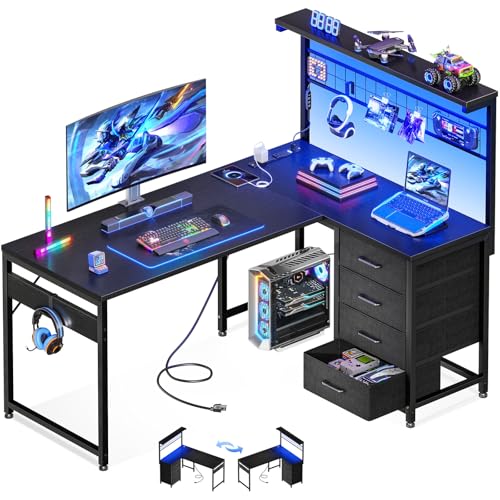
- Best for: corner battlestations that need drawers, charging and light in one footprint.
- Reversible L-shaped layout, hutch and shelves mount on either side
- Desktop width: 43 in; desktop depth: 17.7 in
- Built-in power: 3 AC outlets and 2 USB ports
- Lighting: 2 LED strips, 10 colors, 10 modes, 6 brightness levels, memory function

- Best for: small bedrooms and apartments that need one corner station for work, study and play.
- Listed product dimensions: 32.28 x 41.93 x 35.91 in
- Built-in power strip: 2 AC outlets, 1 USB port, 1 Type-C port
- LED light strip mounted under the upper shelf
- 2-in-1 monitor stand that can also mount as a side display shelf

- Best for: straight-wall setups built around one deep monitor, where surface depth beats built-in extras.
- Overall size: 45.3 in W x 29 in D x 30.5 in H
- Tabletop: MDF with PVC laminate, described as waterproof in the listing
- Cup holder and headphone hook included
- 2 cable management holes in the desktop
All 4 Picks at a Glance
| Product | Specs | Action |
|---|---|---|
| MOTPK L Shaped Gaming Desk |
| Check price on Amazon |
| Bestier 42-Inch L-Shaped Gaming Desk |
| Check price on Amazon |
| Mr IRONSTONE 45.3-Inch Gaming Desk |
| Check price on Amazon |
 Bestier 44-Inch Gaming Desk with Drawer |
| Check price on Amazon |
Key takeaways
- Gaming desks with LED strips, built-in outlets, cup holders and headphone hooks, compared by size, depth and storage to check before you order yours.
A gaming desk purchase usually goes wrong on measurements, not on looks. The real decision is whether the surface fits your room and the way you play: a corner L-shape with drawers behaves very differently from a deep, straight top, desktop depth decides how far your monitor sits from your eyes, and built-in power decides whether cables live on the desk or trail across the floor to a wall socket.
This roundup is for corner setups in bedrooms, small apartments that need one station for work and play, and straight-wall battlestations built around a single large monitor. Every pick below was chosen from its Amazon listing name and specifications, so the dimensions, outlet counts, lighting details and included holders quoted here are the ones the listing itself states.
Quick Picks
As an Amazon Associate we earn from qualifying purchases
| Product | Best for | Key spec from title |
|---|---|---|
| MOTPK L Shaped Gaming Desk | Corner setups that need storage and charging | 43 in reversible L, 3 outlets and 2 USB ports |
| Bestier 42-Inch L-Shaped Gaming Desk | Small corners for work and play | LED strip, 2 outlets plus USB and Type-C |
| Mr IRONSTONE 45.3-Inch Gaming Desk | Straight walls and deep monitors | 45.3 x 29 in top, cup holder, headphone hook |
| Bestier 44-Inch Gaming Desk with Drawer | First setups with gear to stash | Fabric drawer, LED strip with 22 dynamic modes |
How to Choose
Measure the Footprint Before the Features
Start with the wall, not the product photos. Write down the width you can give the desk and whether a corner return can swing left or right, because an L-shaped model that only builds one way can strand its shelves against the wrong wall. Reversible designs solve that, but only if you decide the layout before assembly. Depth matters just as much: a shallow top around 18 inches deep puts a monitor close to your face, while a top near 29 inches deep leaves room for a keyboard, a mat and speakers behind it.
Match Desktop Depth to Your Monitor Setup
A monitor stand with a deep foot eats surface fast. On a shallow gaming desk, the screen ends up close and the keyboard hangs near the edge, which tires your shoulders over a long session. Raised monitor shelves help by lifting the screen and freeing the strip of desk in front of it, but they also fix your screen height, so check the listed shelf height against your chair and eye line. If you run two monitors, add their stand depths together and compare that number with the desktop depth in the listing before anything else.
Decide Whether Power and Lighting Should Be Built In
Desks with a power strip in the frame put outlets at elbow height, so a PC, monitor, lamp and phone charger plug in without a cable drop to the floor. Count the outlets and note whether USB and Type-C ports are included, because that decides how many wall adapters you still need. LED strips are the other built-in extra worth checking closely: look for the number of colors and modes in the listing, and for a memory function that restores your last setting instead of restarting the light show every time you switch the desk on.
Count the Storage and Small Parts
The accessories decide how tidy the desk stays after week one. Drawers and a pegboard swallow controllers, cables and spare parts that otherwise pile up beside the keyboard. A CPU stand keeps a tower off carpet and away from dust, while a cup holder moves drinks off the mouse area and a headphone hook keeps a headset off the chair. Cable holes or a routing channel are easy to overlook in photos, yet they decide whether the back edge of the desk looks finished or tangled once everything is plugged in.
The 4 Best Options
MOTPK L Shaped Gaming Desk
- Best for: corner battlestations that need drawers, charging and light in one footprint.
- Reversible L-shaped layout, hutch and shelves mount on either side
- Desktop width: 43 in; desktop depth: 17.7 in
- Built-in power: 3 AC outlets and 2 USB ports
- Lighting: 2 LED strips, 10 colors, 10 modes, 6 brightness levels, memory function
corner battlestations that need drawers, charging and light in one footprint.
the 17.7 in desktop depth is shallow, so measure a large monitor’s stand foot before ordering.
Pick this one when the corner has to hold the whole setup, not just the screen. The reversible L layout lets the hutch and shelves sit on either side, and the storage count is the highest here: four drawers, a pegboard, a shelf and a CPU stand, so controllers, spare cables and the tower itself all get a fixed home. Power is built into the frame with three outlets and two USB ports, and twin LED strips run ten colors and ten modes with a memory function, so the corner works as a charging station and a gaming nook at the same time.
Bestier 42-Inch L-Shaped Gaming Desk
- Best for: small bedrooms and apartments that need one corner station for work, study and play.
- Listed product dimensions: 32.28 x 41.93 x 35.91 in
- Built-in power strip: 2 AC outlets, 1 USB port, 1 Type-C port
- LED light strip mounted under the upper shelf
- 2-in-1 monitor stand that can also mount as a side display shelf
small bedrooms and apartments that need one corner station for work, study and play.
this is a 42 in class desk, so the main surface suits a laptop or a single monitor better than a dual-screen rig.
This is the compact corner option for a room that has to switch between homework, office hours and gaming at night. The upper stand works two ways, as a raised monitor shelf or as a side display shelf, and the storage shelves below it can be installed facing either direction to suit the corner you have. An LED strip sits under that upper shelf and washes the desktop in light, while the built-in strip provides two outlets plus USB and Type-C charging at desk height. A side hook takes headphones or a backpack so neither ends up on the chair.
Mr IRONSTONE 45.3-Inch Gaming Desk
- Best for: straight-wall setups built around one deep monitor, where surface depth beats built-in extras.
- Overall size: 45.3 in W x 29 in D x 30.5 in H
- Tabletop: MDF with PVC laminate, described as waterproof in the listing
- Cup holder and headphone hook included
- 2 cable management holes in the desktop
straight-wall setups built around one deep monitor, where surface depth beats built-in extras.
there is no built-in lighting or power strip, so you will add your own strip and lighting if you want them.
Choose the IRONSTONE when depth matters more than gadgets. Its top runs a full 29 inches deep, the deepest here, so a large monitor with a chunky stand still leaves a proper keyboard zone in front of it, and the straight shape drops against any wall without corner planning. The surface is an MDF top with a PVC laminate the listing describes as waterproof, which suits a desk that also holds drinks during long sessions; the included cup holder and headphone hook keep both off the playing surface, and two cable holes in the top route wires down the back instead of across your mouse path.
Bestier 44-Inch Gaming Desk with Drawer
- Best for: first gaming setups in spare corners that need light-duty storage within reach.
- 44 in desktop sized for small spaces
- Fabric drawer and PC shelf for storage
- LED strips with 7 static colors and 22 dynamic modes
- Reversible storage shelves
first gaming setups in spare corners that need light-duty storage within reach.
the drawer and side bag are fabric pieces meant for light items, so keep heavy gear on the PC shelf instead.
This straight 44-inch desk is the pick for a first setup that still needs somewhere to put things. A fabric drawer and a PC shelf handle the everyday clutter, the storage shelves can be reversed to match the room, and a side storage bag plus a headphone hook catch the small items that usually migrate across the desktop. The LED strips run seven static colors and twenty-two dynamic modes, which gives a small room a finished gaming feel without a separate light purchase. It keeps the footprint modest while still reading as a gaming desk rather than a plain study table.
Which One Fits Your Situation
A Corner Bedroom That Has to Hold Everything
If one corner must swallow the tower, the peripherals and the charging cables, take the MOTPK. Its four drawers, pegboard and CPU stand give every item a fixed place, the reversible build fits either corner, and the built-in outlets mean the whole station plugs in at desk height instead of relying on a floor strip behind the shelves.
A Small Apartment Corner for Work and Play
The Bestier 42-inch L-shape fits where a full desk cannot. Its stand doubles as a display shelf, the light strip under it works as a reading light by day and ambient light at night, and USB plus Type-C charging at the desktop keeps a laptop, phone and headset running from one compact station.
A Straight Wall and One Big Monitor
Go with the Mr IRONSTONE. The 29-inch-deep top is the reason: a large monitor with a deep stand still leaves a comfortable keyboard zone, and the cup holder keeps drinks out of the mouse area. You give up built-in lighting and outlets, so plan on adding your own strip behind the desk.
A First Setup With Gear to Stash
The Bestier 44-inch with drawer suits a first battlestation on a tight footprint. The fabric drawer takes controllers and cables, the PC shelf keeps the tower off the floor, and the LED modes give the setup a finished look while the reversible shelves let the desk adapt if the room layout changes later.
Common Mistakes
- Buying by width alone and ignoring desktop depth, then finding the monitor sits inches from your face.
- Measuring an L-shaped desk as a straight run and forgetting the return side needs its own wall space.
- Assuming every LED strip remembers your settings, when only some listings state a memory function.
- Plugging every device into the desk’s built-in strip without checking the outlet and port count in the listing first.
- Skipping the cup holder and headphone hook during assembly, then losing the small parts before you decide you want them.
Frequently Asked Questions
Do gaming desks need built-in power outlets?
They are not required, but they change how the setup feels day to day. A strip built into the frame puts charging at desk height and keeps cables off the floor, which matters in small rooms. If a desk has no strip, you will run a separate one behind it, so factor that into the layout before you buy.
Can an L-shaped gaming desk sit against a straight wall?
Yes, as long as the return section has somewhere to go. The return becomes a side surface for a console, printer or storage, but it still occupies floor space, so measure both directions of the L from the listing dimensions. Reversible models help because the return and shelves can be built on the side that fits your room.
How much desktop depth does a monitor setup need?
Enough that the screen sits at a comfortable viewing distance with the keyboard fully on the desk. Shallow tops near 18 inches deep work for laptops and small monitors, while large monitors with deep stands are happier on tops closer to 24 to 29 inches deep. Compare your stand’s depth with the desktop depth printed in the listing.
How are the LED strips on these desks controlled?
It depends on the model. The listings here describe strips with set color counts and mode counts, and the MOTPK also lists a memory function that restores your last setting after power-off. Check the listing for how its strip is switched and whether brightness levels are stated, since controls differ between brands and even between models from one brand.