Key takeaways
- Compare the best 4K OLED computer monitors for remote work, with sharp text, vivid colour, glare-free panels and laptop-friendly USB-C on every top pick.
Remote work lives or dies by the screen in front of you, and a 4K OLED monitor changes the maths of that decision. Text stays crisp at small sizes, spreadsheets stretch across a wide canvas without squinting, and the deep blacks of an OLED panel make long reading sessions easier on the eyes. The trade-off is that these panels cost far more than a standard office display, and not every model suits a desk built around a laptop, video calls and static documents.
This guide is for home-office workers who spend full days at a desk, for laptop users who want a single-cable setup, for people who mix documents with photo or video work, and for anyone whose desk only fits one large screen. Each monitor below was chosen from the name and specifications shown on its Amazon page, with panel type, resolution, refresh rate, connectivity and warranty all taken from the listing.
Quick Picks
As an Amazon Associate we earn from qualifying purchases.
| Product | Best for | Key spec from title |
|---|---|---|
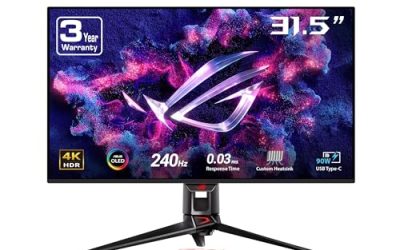
| ASUS ROG Swift PG32UCDM | A large desk with a laptop dock setup | 32-inch 4K QD-OLED, 240Hz, 90W USB-C |
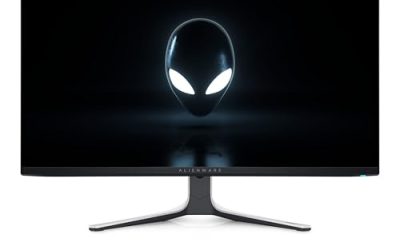
| Alienware AW3225QF | A curved screen for immersive multitasking | 32-inch 4K QD-OLED, 240Hz, 0.03ms response |
| Samsung Odyssey OLED G8 G80SD | A bright room with built-in smart features | 32-inch 4K QD-OLED, 240Hz, glare-free display |
| ASUS ROG Swift PG27UCDM | A smaller desk needing the sharpest text | 27-inch 4K QD-OLED, 240Hz, DisplayPort 2.1a |
How to Choose
Screen size and pixel density
A 32-inch 4K panel gives you room for two full windows side by side, which suits people who keep a document open next to email or a video call. A 27-inch 4K panel packs the same pixels into a smaller area, so text looks noticeably sharper, which matters if your work is mostly reading and writing. Measure your desk depth before choosing: a 32-inch screen wants roughly an arm’s length of viewing distance, while a 27-inch model works on shallower desks. If you sit close to the screen, the smaller panel often feels more comfortable over a full working day.
Panel type and text clarity
All four monitors here use QD-OLED panels, which deliver perfect blacks and wide colour, but the subpixel layout can make small text look slightly fringed compared with a conventional LCD. Newer generations of QD-OLED have improved this a great deal, and the 27-inch ASUS in this guide has the highest pixel density of the group, which helps most. If your day is mainly text, prioritise pixel density and a matte or glare-free coating. If your day is mainly images and video, colour coverage and contrast matter more, and any of these panels will serve you well.
Connectivity and laptop docking
A monitor that charges your laptop over USB-C turns one cable into a dock, carrying video, data and power together. The ASUS PG32UCDM supplies 90W over USB-C, enough for most work laptops, while the Samsung G80SD adds smart TV apps and built-in speakers for video calls. Check whether your laptop has USB-C with DisplayPort output, and confirm the wattage your laptop needs to charge while working; a thin ultrabook may be happy with less, while a larger machine may need the full amount. A built-in KVM switch is also worth having if you switch between a work laptop and a personal computer.
Power, ventilation and OLED care
These are mains-powered displays with an external or internal power supply, so set them up with care. Plug the monitor directly into a wall outlet or a good-quality surge-protected power strip, keep the ventilation slots clear of books and cables, and never place drinks on or beside the unit. Unplug the display during electrical storms or long absences, and let the panel cool before moving it. OLED panels also need sensible habits: use the built-in pixel refresh and screen-shift features, avoid leaving a static window open at full brightness for hours, and use a screensaver or sleep timer when you step away.
The 4 Best Options
ASUS ROG Swift PG32UCDM

This 32-inch display suits a remote worker who wants one large screen to do everything: documents, calls, editing and the occasional game after hours. Its 90W USB-C port means a work laptop connects with a single cable, and the KVM function lets you share the keyboard and mouse between two machines without extra hardware. The matte QD-OLED panel keeps reflections down in a bright home office, and the 240Hz refresh rate makes scrolling through long documents feel unusually smooth. It is the most versatile pick here for a desk that doubles as a personal workstation.
Specs
- 32-inch QD-OLED panel, 3840 x 2160 resolution
- 240Hz refresh rate, 0.03ms response time
- 99% DCI-P3 colour coverage, True 10-bit colour
- USB-C with 90W power delivery
- DisplayPort 1.4 and HDMI 2.1
- G-SYNC Compatible, custom heatsink
Best for: A large home-office desk where one monitor serves a work laptop and a personal computer.
Watch out for: Confirm your laptop charges over USB-C at the wattage it needs, and check the stand fits your desk depth before ordering.
Alienware AW3225QF

The Alienware takes a different approach with a curved 32-inch QD-OLED panel that wraps slightly around your field of view, which makes a wide spreadsheet or timeline feel more natural to scan. Remote workers who keep three windows open at once will notice the difference, and the curve helps the edges of the screen stay at a similar distance from your eyes. Dolby Vision support and 99% DCI-P3 coverage make it a strong choice for anyone who edits photos or video between meetings, while the 240Hz refresh rate keeps motion fluid. It is a bold-looking screen, but its work credentials are solid.
Specs
- 31.6-inch QD-OLED panel, 3840 x 2160 resolution
- 4K UHD 2160p, 16:9 aspect ratio
- 0.03ms response time
- DisplayPort, HDMI and USB 3.2 Gen 1 connectivity
- 5 USB ports
- OLED display technology
Best for: Multitasking across several windows on a curved screen that keeps the edges within easy view.
Watch out for: The curved panel suits a single viewer sitting centred; check that your desk chair position lines up with the middle of the screen.
Samsung Odyssey OLED G8 G80SD

Samsung’s G80SD is the pick for a home office that doubles as a media room, because it behaves like a smart TV when the workday ends. The glare-free QD-OLED panel handles bright rooms well, the built-in speakers cover video calls without extra hardware, and the Gaming Hub and smart TV apps let you stream without turning on a computer. Height adjustment, swivel and tilt make it easy to set a comfortable posture, and OLED Safeguard+ runs thermal modulation and dynamic cooling to reduce burn-in risk. For a remote worker in a sunlit room, the anti-glare coating alone may settle the choice.
Specs
- 32-inch QD-OLED panel, 3840 x 2160 resolution
- 240Hz refresh rate, 0.03ms response time
- Glare-free matte screen finish
- 250 nits brightness, 1,000,000:1 contrast ratio
- 2 HDMI ports, 2 USB ports, DisplayPort
- Built-in speakers, height adjustment, 3-year manufacturer warranty
Best for: A bright home office where glare is a problem and built-in speakers and smart features add value.
Watch out for: Check the smart features match your streaming services, and confirm the stand height range suits your chair and desk.
ASUS ROG Swift PG27UCDM
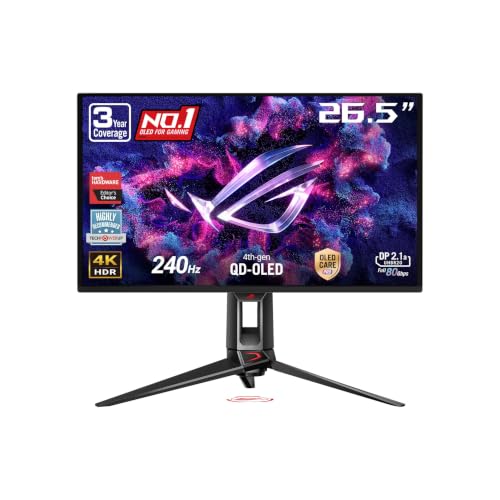
The smallest screen here is also the sharpest, packing 4K into a 26.5-inch viewable area for the highest pixel density of the four. That density makes text look cleaner than on any 32-inch 4K panel, which is exactly what a writer, coder or analyst wants. DisplayPort 2.1a gives it the most modern video input of the group, the Neo Proximity Sensor dims the screen when you walk away, and the custom heatsink supports the panel without a fan. If your desk is compact or you sit close to the display, this is the model that turns a small workspace into a sharp one.
Specs
- 26.5-inch QD-OLED panel, 3840 x 2160 resolution
- 240Hz refresh rate, 0.03ms response time
- DisplayPort 2.1a UHBR20
- 99% DCI-P3 colour coverage, True 10-bit colour
- G-SYNC Compatible, custom heatsink, Neo Proximity Sensor
- 3-year warranty
Best for: A compact desk where the sharpest possible text matters more than maximum screen size.
Watch out for: At 27 inches the windows feel smaller than on a 32-inch screen, so check your usual layout still fits comfortably.
Which One Fits Your Situation
You work from a laptop and want one cable
Pick the ASUS ROG Swift PG32UCDM. Its 90W USB-C port carries video and charges most work laptops at the same time, so your desk stays tidy and docking takes seconds. The KVM switch adds a second computer without a second set of peripherals, which suits people who switch between a work machine and a personal one during the day.
You juggle several windows all day
Pick the Alienware AW3225QF. The curved 32-inch panel keeps a wide layout within comfortable view, and three windows fit side by side without the far edge feeling distant. Its colour coverage also helps when the workday slides into photo or video editing, and the fast panel keeps scrolling smooth.
Your office is bright and your desk does double duty
Pick the Samsung Odyssey OLED G8 G80SD. The glare-free coating is built for sunlit rooms, the built-in speakers handle calls without extra boxes, and the smart apps mean the screen earns its keep after hours. Height adjustment and tilt make it easy to dial in a comfortable viewing angle.
Your desk is small and text is your whole day
Pick the ASUS ROG Swift PG27UCDM. Its 27-inch 4K panel has the highest pixel density here, so small text stays crisp through long reading and writing sessions. The proximity sensor and fanless heatsink keep it quiet and efficient, and DisplayPort 2.1a keeps it current for years.
Common Mistakes
- Buying a 32-inch screen for a shallow desk and then sitting too close, which makes the edges hard to scan and causes neck strain.
- Assuming every USB-C port charges a laptop; check the wattage and whether your laptop supports video over USB-C before ordering.
- Leaving the same static window open at full brightness all day, which raises burn-in risk on any OLED panel.
- Ignoring the stand: a monitor without enough height adjustment forces you to stack books under it or crane your neck.
- Choosing on refresh rate alone, when pixel density, glare handling and connectivity matter far more for remote work.
Frequently Asked Questions
Is a 4K OLED monitor good for remote work?
Yes, for most desk work. The 4K resolution keeps text sharp and gives room for two windows side by side, while OLED contrast makes reading easier in dim rooms. The main cautions are burn-in from static content and the higher cost, so use the panel’s pixel-refresh features and a screensaver, and buy the size that fits your desk rather than the largest available.
Does OLED burn-in matter for office work?
It can, because office work shows the same taskbar and window frames for hours. Modern OLED monitors fight this with pixel shifting, logo detection and periodic refresh cycles, and the Samsung and ASUS models here include those protections. Vary your content, hide the taskbar or use auto-hide, and let the screen sleep when you step away.
What size 4K OLED monitor is best for a home office?
A 32-inch screen suits most home offices because two full windows fit comfortably side by side. A 27-inch 4K panel is better on a compact desk or if you sit close, since its higher pixel density makes text sharper. Measure your desk depth first: a 32-inch display wants roughly an arm’s length of viewing distance.
Do I need USB-C on a monitor for remote work?
Not strictly, but it simplifies a laptop setup a great deal. A single USB-C cable can carry the video signal and charge the laptop, replacing a separate dock. Check that your laptop supports DisplayPort over USB-C and that the monitor’s power delivery covers your laptop’s charging needs before relying on it.