Our Short List of 3
All 4 Picks at a Glance
| Product | Specs | Action |
|---|---|---|
 ASUS ROG Swift PG32UCDM 32-Inch 4K QD-OLED Monitor | Check price on Amazon | |
 Samsung Odyssey OLED G8 G80SD 32-Inch 4K QD-OLED Smart Monitor | Check price on Amazon | |
 LG UltraGear 32GS95UE 32-Inch 4K OLED Dual Mode Monitor | Check price on Amazon | |
 MSI MPG 321URX QD-OLED 32-Inch 4K Monitor | Check price on Amazon |
Key takeaways
- Best 4K OLED computer monitors for CAD workflows: five 32-inch 4K OLED displays compared on color accuracy, panel tech, connectivity, and desk fit.
CAD work puts unusual demands on a display. A monitor for drafting and modeling has to hold fine lines steady, keep colors honest across long sessions, and give enough desktop space for toolbars, layers, and viewports at the same time. A 4K OLED panel answers all three demands at once: the 3840 x 2160 grid packs enough pixels to keep thin lines crisp, the self-lit pixels produce deep blacks and precise contrast for linework, and the wide color gamut keeps rendered materials and shaded views close to what the finished output will look like.
None of the monitors in this guide is marketed by its maker as a CAD display. The listings describe them as gaming monitors, and the fit for CAD work below is judged from their stated specifications: resolution, panel type, color gamut, factory calibration figures, and connectivity. That matters, because a monitor built for fast gaming can still be a strong CAD display when its color numbers are right, and a monitor with a weak color spec is a poor CAD display no matter how fast it refreshes.
Every pick here is a 32-inch class 4K OLED monitor, with both the 4K resolution and the OLED panel stated in the listing. All five use a 240 Hz panel, far more refresh than CAD software needs. What separates them is color coverage, calibration, panel shape, and small details: USB-C power delivery, a KVM switch for a two-machine desk, and burn-in care for a panel showing static toolbars all day.
What To Look For
Resolution comes first. A 4K panel shows a full drawing sheet, a model viewport, and a properties panel side by side without constant zooming in and out. At 32 inches, 4K gives a pixel density near 140 pixels per inch, so thin lines and small dimension text stay readable. A 27-inch 4K panel is sharper still, but leaves less room for palettes.
Panel type is the second filter. OLED pixels emit their own light, so black areas are truly black and a single bright line on a dark background stays clean, with no halo bleeding into the surrounding pixels. That per-pixel control is exactly what linework needs. QD-OLED panels, used by four of the five monitors here, add a quantum-dot layer that widens the color gamut. The LG pick uses a WOLED panel with a micro-lens array instead, which pushes peak brightness higher.
Color accuracy is where CAD picks are won or lost. Look for a stated DCI-P3 gamut figure near 99 percent and a Delta E figure at or below 2, which means the panel leaves the factory with colors close to the reference standard. A 10-bit panel matters too, because it renders smooth gradients in shaded views and renders without visible banding. All five monitors here state a wide DCI-P3 gamut, and two state a Delta E figure directly.
Burn-in care deserves attention on any OLED used for CAD. Toolbars, ribbons, and command lines sit in the same place for hours, and static bright elements are the main burn-in risk. Every monitor here has built-in care features: pixel refresh cycles, pixel shift, and heat management. Use them, hide static interface elements when you can, and let the panel run its refresh cycle when prompted.
Connectivity rounds out the checklist. USB-C with power delivery lets a laptop drive the monitor and charge through one cable. A KVM switch lets one keyboard and mouse serve a workstation and a laptop. DisplayPort and HDMI 2.1 cover desktop graphics cards. A height-adjustable stand matters on a desk used eight hours a day, and a VESA mount lets you put the panel on an arm.
One honest limit applies to all five. OLED panels can show color fringing on very small text because of their subpixel layout, and the effect is more visible on QD-OLED than on WOLED. For most CAD users the fringing is minor at normal viewing distance, but anyone who reads tiny dimension text all day should sit at a normal distance and use the monitor’s text clarity settings.
ASUS ROG Swift PG32UCDM
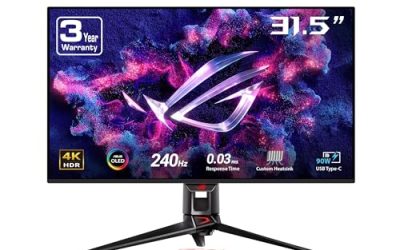
ASUS ROG Swift PG32UCDM 32-Inch 4K QD-OLED Monitor
The ASUS ROG Swift PG32UCDM is the strongest all-round pick in this guide for CAD work, and the reason is color. The listing states a 32-inch 4K QD-OLED panel at 3840 x 2160, a 99 percent DCI-P3 gamut, true 10-bit color, and a Delta E figure below 2. Those four numbers together are what a CAD user needs: the gamut covers the colors used in renders and material libraries, the 10-bit depth keeps gradients smooth, and the Delta E figure means the panel is calibrated close to reference before it leaves the factory.
The panel runs at 240 Hz with a 0.03 ms gray-to-gray response time. CAD software gains nothing from that speed, but the fast panel does no harm, and it keeps the monitor useful if the same desk doubles as a gaming setup after hours. The listing also states Dolby Vision support and DisplayHDR True Black 400 certification, which help shaded views and HDR renders hold detail in dark areas.
Burn-in protection is a real strength here. ASUS fits a custom heatsink and a graphene film behind the panel to pull heat away, and the monitor includes OLED care settings for pixel cleaning and screen shift. Heat is the main driver of OLED wear, so passive cooling built into the chassis is worth more than a software timer alone. The listing also states a three-year warranty.
Connectivity covers a CAD desk well: DisplayPort 1.4, two HDMI 2.1 ports, and USB-C with 90W power delivery, so a laptop can drive the display and charge through a single cable. G-SYNC compatibility is stated for the graphics side. The stand adjusts for height, tilt, swivel, and pivot, and the panel mounts on a VESA arm.
The trade-off is the matte QD-OLED finish, which softens glare but can mute the deepest blacks slightly next to a glossy panel. Text fringing on very small characters is present, as on all QD-OLED panels, though it fades at normal viewing distance.
Samsung Odyssey OLED G8 G80SD
Samsung Odyssey OLED G8 G80SD 32-Inch 4K QD-OLED Smart Monitor
The Samsung Odyssey OLED G8 G80SD pairs the same 32-inch 4K QD-OLED formula with a glare-free coating and a built-in smart platform. The listing states a 4K panel at 3840 x 2160, a 240 Hz refresh, a 0.03 ms response time, and G-Sync compatibility. Samsung lists a 99 percent DCI-P3 gamut for this model, which puts its color coverage on par with the ASUS pick for renders and shaded views.
The glare-free display is the practical advantage. CAD rooms often have overhead lighting and windows behind the user, and a matte-style coating keeps reflections from washing out fine lines. The panel carries DisplayHDR True Black 400 certification, so dark areas in a model hold detail instead of crushing to flat black.
The G80SD is a smart monitor, which means it runs built-in apps and a gaming hub without a connected computer. For CAD work that is a side benefit rather than a core feature, and the smart functions do not change the panel’s color behavior. The three-year warranty is stated in the listing, and the monitor includes OLED Safeguard features for burn-in care.
Connectivity includes DisplayPort 2.1, HDMI 2.1, and USB-C, plus a 100 x 100 mm VESA mount pattern stated in the listing. The stand is a slim metal design with height, tilt, swivel, and pivot adjustment. The panel is flat, which suits drafting, since straight lines stay straight across the full width.
Confirm the USB-C power delivery figure on the listing before buying, since it varies between Samsung’s own pages for this model. The G80SD is a strong fit for a bright CAD room where glare control matters as much as color.
LG UltraGear 32GS95UE
LG UltraGear 32GS95UE 32-Inch 4K OLED Dual Mode Monitor
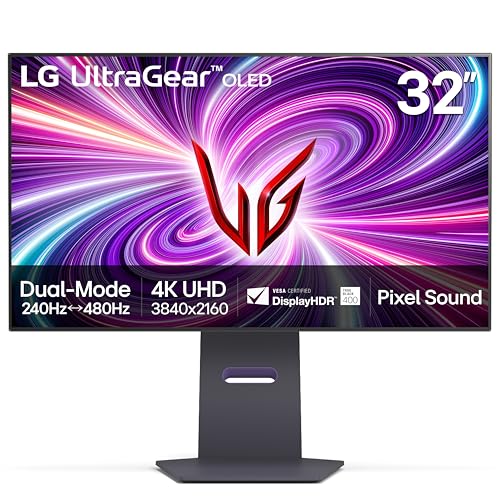
The LG UltraGear 32GS95UE takes a different route to the same goal. Instead of QD-OLED, it uses a WOLED panel with a micro-lens array, which LG calls MLA+, and the listing states a 32-inch 4K panel at 3840 x 2160 with a 240 Hz refresh and a 0.03 ms response time. The micro-lens layer pushes peak brightness higher than the QD-OLED picks here, which helps in a bright room and keeps HDR renders vivid.
LG states a 98.5 percent DCI-P3 gamut for this panel, a touch below the 99 percent figures on the QD-OLED models, and the difference is small enough that it will not show in everyday CAD work. The panel carries DisplayHDR True Black 400 certification. The WOLED subpixel layout also shows less color fringing on small text than QD-OLED, which is a genuine advantage when the screen is full of dimension labels and small annotations.
The headline feature is Dual Mode: the monitor runs at 4K and 240 Hz, or drops to full HD at 480 Hz for fast motion. CAD work lives in the 4K mode, so the second mode is a bonus for other uses rather than a drafting feature. The listing also states Pixel Sound, which plays audio through the panel itself using DTS Virtual:X processing, so the monitor can stand alone without desk speakers.
Connectivity includes DisplayPort and HDMI 2.1, and the stand adjusts for height, tilt, and swivel. The panel is flat. Burn-in care is handled by LG’s OLED care routines, including pixel cleaning cycles.
The trade-off is the gamut figure, a half point below the QD-OLED group, and brightness that matters most for HDR content rather than linework. For a CAD user who reads small text all day in a bright room, the WOLED panel and its cleaner text rendering make this a strong pick.
MSI MPG 321URX QD-OLED
MSI MPG 321URX QD-OLED 32-Inch 4K Monitor
The MSI MPG 321URX QD-OLED is the most desk-friendly pick in this guide, thanks to a built-in KVM switch and the strongest connectivity of the five. The listing states a 31.5-inch 4K QD-OLED panel at 3840 x 2160, a 240 Hz refresh, and a 0.03 ms response time. MSI lists a 99 percent DCI-P3 gamut and a Delta E figure of 2 or less, which matches the ASUS pick on the two numbers that matter most for color-critical CAD work.
The panel carries DisplayHDR True Black 400 certification, and MSI states an HDR peak brightness of 1000 nits. That peak figure applies to small bright areas in HDR content, not to the full screen, but it keeps HDR renders and shaded views lively. The panel is flat, so straight lines stay straight.
The KVM switch is the feature that sets this monitor apart for a two-machine CAD desk. One keyboard and mouse can serve a desktop workstation and a laptop through the monitor, switching between them without replugging cables. USB-C with 90W power delivery charges the laptop at the same time. HDMI 2.1 ports run at the full 48 Gbps bandwidth, and DisplayPort 1.4a covers desktop graphics cards.
Burn-in care comes from MSI OLED Care 2.0, which includes pixel refresh, panel protection routines, and a graphene film with a custom heatsink. MSI covers OLED burn-in under a three-year warranty, which is the clearest burn-in promise in this group.
The panel measures 31.5 inches rather than a full 32, a difference that changes nothing in use. Text fringing follows the usual QD-OLED pattern on very small characters. For a CAD user with a workstation and a laptop on one desk, the KVM switch and the Delta E figure make this the most practical pick.
Dell Alienware AW3225QF
Dell Alienware AW3225QF 32-Inch 4K QD-OLED Curved Monitor
The Dell Alienware AW3225QF is the only curved monitor in this guide, and that curve is both its appeal and its warning for CAD work. The listing states a 31.6-inch 4K QD-OLED panel at 3840 x 2160, a 240 Hz refresh, a 0.03 ms response time, and a 1700R curve. Dell lists a 99 percent DCI-P3 gamut, Dolby Vision support, and DisplayHDR True Black 400 certification, so the color numbers match the flat QD-OLED picks.
A curved panel wraps the image around the viewer and can feel immersive for modeling, since the edges of the screen sit closer to the eyes. The trade-off is geometric: a straight line drawn across a curved screen can look bowed near the edges, and a long horizontal dimension line may not look straight. For 3D modeling and renders the curve is harmless. For 2D drafting, where straightness is the whole point, a flat panel is the safer choice, and this monitor should be picked with that trade-off in mind.
Connectivity includes DisplayPort, HDMI 2.1, and USB-C, and the listing states G-SYNC and FreeSync Premium Pro support. The stand is the Alienware lunar-light design with height, tilt, swivel, and pivot adjustment, and the panel mounts on a VESA arm. Dell states a three-year warranty.
Burn-in care follows Dell’s OLED routines, with pixel refresh cycles built into the monitor. The panel’s peak brightness and color volume match the other QD-OLED models here, so renders and shaded views look the same as on the flat picks.
Pick this one if the desk is used for 3D modeling and the curve appeals to you. If the work is mostly 2D drafting with long straight lines, one of the flat panels above is the better fit.
Comparison Table
| Monitor | Size | Panel | Resolution | Gamut | Delta E | USB-C Power | Curve |
|---|---|---|---|---|---|---|---|
| ASUS ROG Swift PG32UCDM | 32-inch | QD-OLED | 3840 x 2160 | 99 percent DCI-P3 | Below 2 | 90W | Flat |
| Samsung Odyssey OLED G8 G80SD | 32-inch | QD-OLED | 3840 x 2160 | 99 percent DCI-P3 | Not stated in listing | USB-C | Flat |
| LG UltraGear 32GS95UE | 32-inch | WOLED with MLA+ | 3840 x 2160 | 98.5 percent DCI-P3 | Not stated in listing | Not stated in listing | Flat |
| MSI MPG 321URX QD-OLED | 31.5-inch | QD-OLED | 3840 x 2160 | 99 percent DCI-P3 | 2 or less | 90W | Flat |
| Dell Alienware AW3225QF | 31.6-inch | QD-OLED | 3840 x 2160 | 99 percent DCI-P3 | Not stated in listing | USB-C | 1700R curved |
Frequently Asked Questions
Is a 4K OLED monitor a good fit for CAD work?
Yes, with one condition: the color numbers have to be right. A 4K OLED panel gives dense pixels for fine linework, per-pixel light control for clean contrast, and a wide gamut for renders. Check the listing for a stated DCI-P3 figure near 99 percent and a Delta E figure at or below 2. A gaming monitor with those numbers is a strong CAD display, while a monitor without them is a poor one.
Does OLED burn-in matter for CAD use?
It deserves attention, because CAD interfaces keep toolbars, ribbons, and command lines in fixed positions for hours. Every monitor in this guide has built-in care routines: pixel refresh cycles, pixel shift, and heat management. Let the panel run its refresh cycle when prompted, hide static interface elements when you can, and vary the content on screen during breaks. MSI covers burn-in under a three-year warranty, which is the clearest promise in this group.
Should I pick a curved or a flat monitor for CAD?
For 2D drafting, pick flat. A curved panel can make long straight lines look bowed near the edges, which is a real drawback when straightness is the point of the drawing. For 3D modeling and renders, the curve is harmless and some users find it immersive. Four of the five monitors in this guide are flat, and the only curved pick is the Dell Alienware AW3225QF, flagged as such above.
How To Choose
Begin with color. If renders and material accuracy matter, pick a monitor with a stated Delta E figure at or below 2 and a 99 percent DCI-P3 gamut: the ASUS PG32UCDM or the MSI MPG 321URX. Both state those figures directly in their listings.
Next, match the panel to the room. A bright room with overhead lights favors the Samsung G80SD with its glare-free coating or the LG 32GS95UE with its brighter MLA+ panel. A controlled room with soft lighting suits any of the five.
Then look at the desk. A two-machine desk with a workstation and a laptop favors the MSI MPG 321URX, because its KVM switch and 90W USB-C power delivery serve both machines through one set of cables. A single-machine desk can use any pick, and the ASUS PG32UCDM gives the strongest combination of calibration and burn-in care.
Finally, decide on shape. Four picks are flat, which suits drafting. The Dell AW3225QF is curved, which suits 3D modeling and users who like the wrap-around feel. Whichever you pick, confirm the exact listing before checkout, run the panel’s pixel refresh cycle when prompted, and judge text clarity over a few days of real drafting work.
Disclosure: As an Amazon Associate, we may earn a commission from qualifying purchases made through links in this article, at no additional cost to you.